
Reviews
Your graphics add a nice touch to my presentations and I recently used them for one of my all-hands meetings. Your toolbox adds professionalism to my slides. Instead of using standard clipart.
I needed a fresh look at some of my slides. I've tried to find a way to create a paintbrush effect, to underline, accentuate, add some color and the handwritten markers were just the things. Very easy to use, easy to size, change the color. It was an affordable, perfect solution and I'm happy to recommend it.
The crisp, clean look of the graphics, and the fact that it allowed me to easily edit and change the colors to match the template was my main reason for purchasing them.
Description
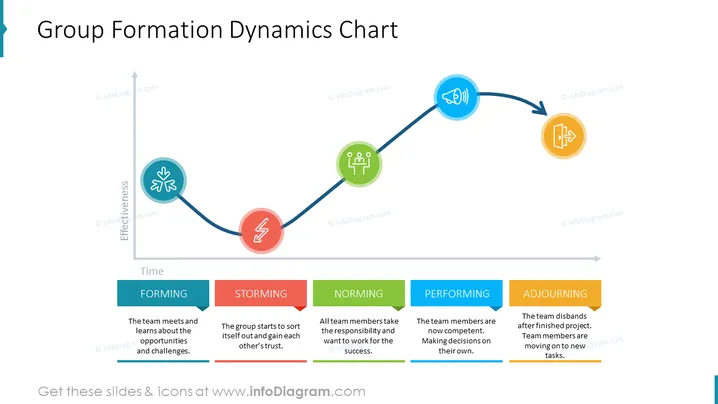
Group Formation Dynamics Chart
Slide Content
This slide is about the stages of team development, aptly titled "Group Formation Dynamics Chart." It shows a timeline with five distinct phases: Forming, Storming, Norming, Performing, and Adjourning. In the Forming stage, the team meets and learns about opportunities and challenges. During Storming, members sort themselves out and build trust. Norming is about taking responsibility and working towards collective success. In Performing, members make their own decisions, indicating a high level of competence. Lastly, Adjourning signifies the team disbanding as the project concludes and members move on.
Graphical Look
- The slide features a horizontal timeline running from left to right with five circular nodes, each representing a different stage of group formation.
- Each node contains an icon symbolizing the stage: handshakes (Forming), a lightning bolt (Storming), group (Norming), speaker volume (Performing), and checklist (Adjourning).
- The timeline is depicted as a dark line connecting these nodes, with an upward-facing arrow at the beginning that intersects with a 'Time' axis, and an 'Effectiveness' axis running vertically.
- A smooth, wave-like pattern indicates the progression through the stages, with ups and downs between the nodes.
- Below the timeline, colored rectangular shapes correspond with each phase, filled with a brief explanation for each stage.
- The five stages are colored distinctly: Forming (blue), Storming (red), Norming (green), Performing (blue again), and Adjourning (orange).
The overall design is clean and modern, with a use of simple icons and color coding for easy understanding of the group development stages. The graphical elements such as the timeline curve and icons are vector-based, providing a professional and engaging presentation of the concept.
Use Cases
- Teaching the concepts of team development in an organizational behavior or management training session.
- Facilitating team-building workshops to help participants understand the phases their team may go through.
- Planning and assessing team progress during project management meetings to strategically improve team performance.
- Debriefing and reviewing after project completion to help team members reflect on their developmental journey.
How to Edit
How to edit text & colors

How to expand / shorten diagram

How to Replace Icons in infoDiagram PPT


