
Reviews
Your slides are my "secret sauce" when it comes to presenting my ideas to clients. I save a lot of time.
J'avais un délai de livraison à respecter et je n'avais pas le temps de créer une variété de modèles de diapositives. Infodiagram m'a proposé des options faciles à télécharger et à personnaliser en fonction de mes besoins !
Vos diapositives suscitent souvent de précieux commentaires et idées de la part de mon équipe, ce qui améliore les diapositives finales.
Description
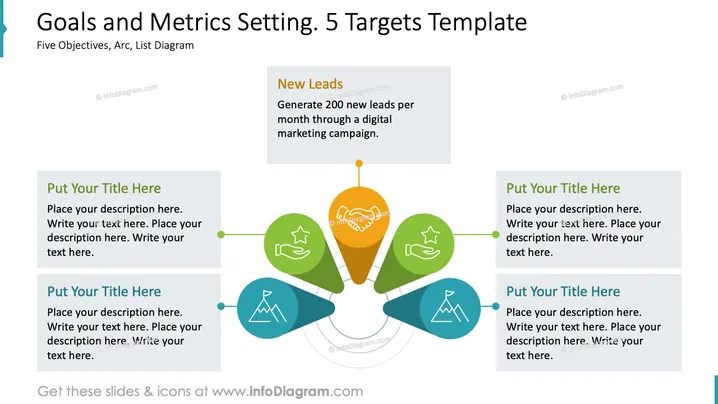
Goals and Metrics Setting: 5 Targets Template
Slide Content
The PowerPoint slide titled "Goals and Metrics Setting: 5 Targets Template" presents a system for outlining five distinct objectives using a central target icon and peripheral elements. Each goal is associated with a placeholder for a title and description, demonstrating an organized approach to strategizing. The example given, "New Leads," clarifies the goal of generating 200 new leads monthly through a digital marketing campaign, elucidating what kind of specific target could be set using this template.
Graphical Look
- The slide background is white with a dark blue title bar at the top.
- Dominating the slide is a central orange circular shape with a target icon, connecting to five outbound arcs.
- Each arc links to a colored teardrop-shaped area: green on the top-left and bottom-right, blue on the top-right and bottom-left.
- Inside each teardrop, there is a unique icon: star, handshake, circular recycle arrows, and a mountain peak.
- Text boxes with a gray background and light gray border sit adjacent to each teardrop, designated for titles and descriptions.
- A single example text box in the top-left corner provides a sample goal with a specific objective.
The central target and the arcs visually represent a network originating from a central point. The slide is neatly organized with a clear focal point surrounded by related elements that seem to flow from the center to represent interconnected goals. The use of color helps to distinguish between different areas of focus, while icons add visual cues to each goal's theme.
Use Cases
- To define and present key performance indicators (KPIs) and objectives in a business strategy meeting.
- In a marketing presentation to outline specific campaign goals and planned outcomes.
- During a project kickoff to communicate the main targets each team or department should achieve.
- As part of a quarterly review to illustrate progress toward reaching certain business targets.
How to Edit
How to edit text & colors

How to expand / shorten diagram

How to Replace Icons in infoDiagram PPT


