

Your graphics add a nice touch to my presentations and I recently used them for one of my all-hands meetings. Your toolbox adds professionalism to my slides. Instead of using standard clipart.
Claude Jones, Director of Engineer, @Walmartlabs, USA

Your graphics add a nice touch to my presentations and I recently used them for one of my all-hands meetings. Your toolbox adds professionalism to my slides. Instead of using standard clipart.
Claude Jones, Director of Engineer, @Walmartlabs, USA
I needed a fresh look at some of my slides. I've tried to find a way to create a paintbrush effect, to underline, accentuate, add some color and the handwritten markers were just the things. Very easy to use, easy to size, change the color. It was an affordable, perfect solution and I'm happy to recommend it.
Anonymous, US
The crisp, clean look of the graphics, and the fact that it allowed me to easily edit and change the colors to match the template was my main reason for purchasing them.
Brandie Jenkins, E-learning Developer, USA
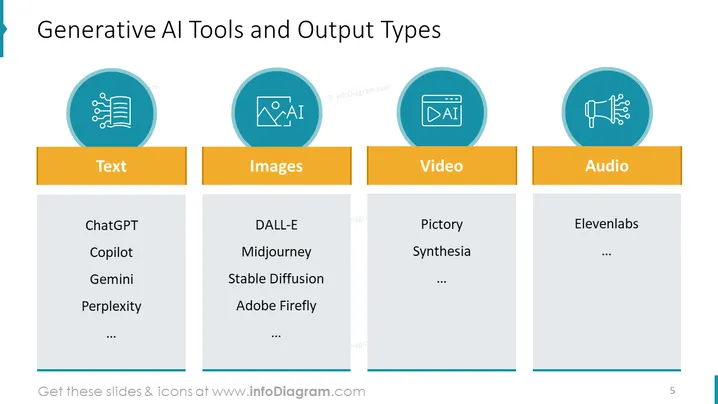
The slide is titled "Generative AI Tools and Output Types" and categorizes different artificial intelligence tools based on the type of content they generate. The categories presented are Text, Images, Video, and Audio. Under Text, tools like ChatGPT, Copilot, Gemini, and Perplexity are listed, which are likely AI platforms that produce written content. Images include DALL-E, Midjourney, Stable Diffusion, and Adobe Firefly, suggesting they are AI tools for creating or editing visual content. Video lists Pictory and Synthesia, which probably refers to AI that generates or manipulatively moves images, while Audio presents Elevenlabs as an example, possibly an AI platform for sound generation or voice synthesis.
The slide presents a visually organized and crisp look, with a professional color scheme. The use of icons and color blocks effectively delineates the categories without being visually overwhelming.



