

Your graphics add a nice touch to my presentations and I recently used them for one of my all-hands meetings. Your toolbox adds professionalism to my slides. Instead of using standard clipart.
Claude Jones, Director of Engineer, @Walmartlabs, USA

Your graphics add a nice touch to my presentations and I recently used them for one of my all-hands meetings. Your toolbox adds professionalism to my slides. Instead of using standard clipart.
Claude Jones, Director of Engineer, @Walmartlabs, USA
I needed a fresh look at some of my slides. I've tried to find a way to create a paintbrush effect, to underline, accentuate, add some color and the handwritten markers were just the things. Very easy to use, easy to size, change the color. It was an affordable, perfect solution and I'm happy to recommend it.
Anonymous, US
The crisp, clean look of the graphics, and the fact that it allowed me to easily edit and change the colors to match the template was my main reason for purchasing them.
Brandie Jenkins, E-learning Developer, USA
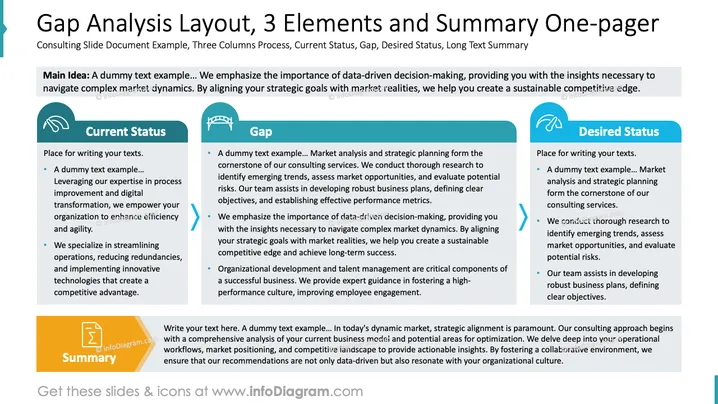
The slide presents a comprehensive overview of gap analysis through three main sections: Current Status, Gap, and Desired Status. The Current Status highlights leveraging process improvement and digital transformation for enhanced efficiency. The Gap section focuses on market analysis and strategic planning, identifying trends, and assessing risks for robust business planning. The Desired Status emphasizes comprehensive strategies and objectives to achieve a competitive edge. A Summary box outlines strategic alignment and a data-driven consulting approach for actionable insights.
Three Column Layout: The slide features a three-column structure with distinct sections for "Current Status," "Gap," and "Desired Status," using rounded rectangular boxes.
Icons: Each section has an icon: a handshake for Current Status, a bridge for Gap, and an arrow for Desired Status, illustrating progression.
Arrows: Between sections, blue arrows indicate directionality, suggesting a process flow from Current to Desired Status.
Color Scheme: Blue and orange hues dominate the slide, demarcating different sections effectively.
Summary Box: Located at the bottom, the Summary section in orange underlines key points, accompanied by a summary icon.
Main Heading and Subheading: Title and subtitle at the top in black, followed by a gray highlighting box for emphasis on insights and goals.
The slide is visually structured clearly, with distinct sections and icons that communicate progression and analysis effectively. The use of color and graphics enhances readability and engagement.
Business Strategy Presentations: Illustrates gap analysis to strategize business improvements.
Consulting Proposals: Presents comprehensive consultancy insights in a streamlined manner.
Project Management Reviews: Offers a snapshot of current, gap, and future states for project evaluation.
Workshops and Training: Facilitates learning sessions on strategic planning and market analysis.



