
Reviews
Deine Folien sind meine 'geheime Zutat', wenn es darum geht, meine Ideen Kunden zu visualisieren. Ich spare so viel Zeit.
Ihre Folien führen oft zu guten Kommentaren und Ideen meines Teams, die die endgültigen Folien verbessern.
Description
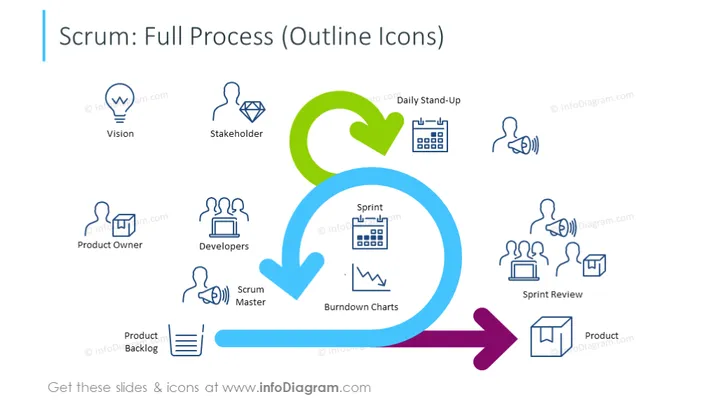
Scrum: Full Process Illustrated with Outline Icons
Slide Content:
The slide outlines the comprehensive Scrum process in agile project management.
- Vision: Represents the project's initial conceptual stage.
- Stakeholder: Denotes the interests of those invested in the project's outcome.
- Product Owner: Responsible for maximizing the value of the product resulting from the work of the Scrum Team.
- Developers: Professionals who do the actual work of creating the product.
- Scrum Master: Ensures that the Scrum process is followed effectively.
- Daily Stand-Up: A short meeting for the team to sync up on progress.
- Sprint: A set period during which specific work has to be completed.
- Burndown Charts: Tracks the completion of work during the sprint.
- Sprint Review: A meeting at the end of the sprint to assess the work done.
- Product Backlog: A prioritized list of work for the development team.
- Product: The outcome of the Scrum process.
Graphical Look:
- A series of outline icons represent different components of the Scrum process, with accompanying labels.
- Icons include a lightbulb for 'Vision', a person for 'Stakeholder', a checklist for 'Product Owner', three figures for 'Developers', a circular arrow for the 'Scrum Master', and others for 'Daily Stand-Up', 'Sprint', 'Burndown Charts', 'Sprint Review', and 'Product Backlog'.
- A curved arrow flows from one icon to the next, indicating the sequence of the process.
- The color scheme includes blue, green, and purple for the arrows and icons, creating a harmonious and professional appearance.
- Each icon is accompanied by a brief description, ensuring clarity and comprehension.
The overall look of the slide is professional, with a clear focus on visual communication through icons and minimal text. The use of colors is restrained and serves to guide the viewer through the Scrum process steps effectively.
Use Cases:
- In a business presentation to introduce the Scrum framework to team members or new employees.
- During a workshop or seminar on agile methodologies, providing a visual aid to attendees.
- As part of a training session for project managers transitioning to agile project management.
- To explain the workflow to stakeholders or clients unfamiliar with the Scrum methodology.
How to Edit
How to edit text & colors

How to expand / shorten diagram

How to Replace Icons in infoDiagram PPT


