
Reviews
Your graphics add a nice touch to my presentations and I recently used them for one of my all-hands meetings. Your toolbox adds professionalism to my slides. Instead of using standard clipart.
I needed a fresh look at some of my slides. I've tried to find a way to create a paintbrush effect, to underline, accentuate, add some color and the handwritten markers were just the things. Very easy to use, easy to size, change the color. It was an affordable, perfect solution and I'm happy to recommend it.
The crisp, clean look of the graphics, and the fact that it allowed me to easily edit and change the colors to match the template was my main reason for purchasing them.
Description
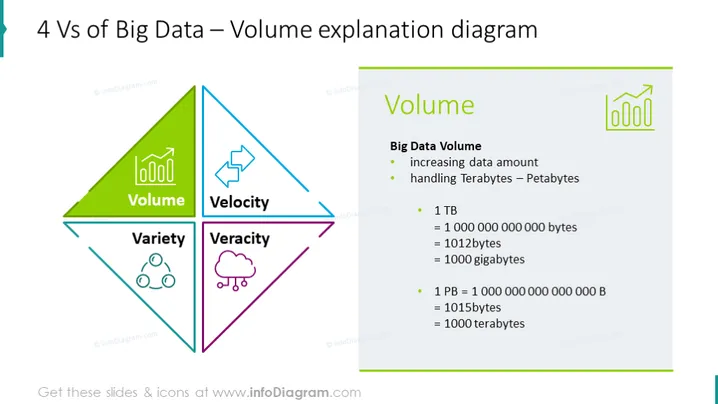
4 Vs of Big Data – Volume explanation diagram
Slide Content:
This slide focuses on the 'Volume' aspect of the 4 Vs of Big Data, explaining it as the increasing amount of data being processed, ranging from Terabytes to Petabytes. It provides a detailed explanation of what these quantities mean: 1 Terabyte (TB) is equal to 1 trillion bytes and 1 Petabyte (PB) is equal to 1 quadrillion bytes, breaking them down into more comprehensible units such as gigabytes and tebibytes.
Graphical Look:
- The central diamond shape is divided into four colored segments, with the 'Volume' segment highlighted in green.
- A bar chart icon is placed within the green 'Volume' segment.
- The right side of the slide features an enlarged text 'Volume' with a matching bar chart icon beside it in green.
- Each bullet point is followed by an explanation, using numbers to quantify Terabytes and Petabytes.
The slide's design is clean and focused, with a large central graphic that uses color coding to highlight the 'Volume' aspect of Big Data. The combination of graphical icons with textual explanations provides a clear representation of the concept.
Use Cases:
- To educate an audience on the basics of Big Data and its implications in technology or business sectors.
- In a corporate training session, detailing the challenges and considerations in data management.
- During a conference talk, to illustrate the scale of data that modern businesses or technologies handle.
- As part of a university lecture on data science or information technology, to explain data measurement units.
How to Edit
How to edit text & colors

How to expand / shorten diagram

How to Replace Icons in infoDiagram PPT


