
Reviews
Ihre Grafiken verleihen meinen Präsentationen eine nette Note, und ich habe sie kürzlich für eines meiner All-Hands-Meetings verwendet. Ihre Toolbox verleiht meinen Folien Professionalität, anstatt Standard-Clipart zu verwenden.
Ich brauchte einen neuen Blick auf einige meiner Folien. Ich habe versucht, einen Weg zu finden, einen Pinselschlag-Effekt zu erzielen, um zu unterstreichen, hervorzuheben, Farbe hinzuzufügen, und die handgeschriebenen Markierungen waren genau das Richtige. Sehr einfach zu bedienen, leicht in der Größe zu ändern, die Farbe zu ändern. Es war eine erschwingliche, perfekte Lösung und ich empfehle sie gerne weiter.
Die klare, saubere Optik der Grafiken und die Tatsache, dass ich die Farben leicht bearbeiten und an die Vorlage anpassen konnte, war mein Hauptgrund für den Kauf.
Description
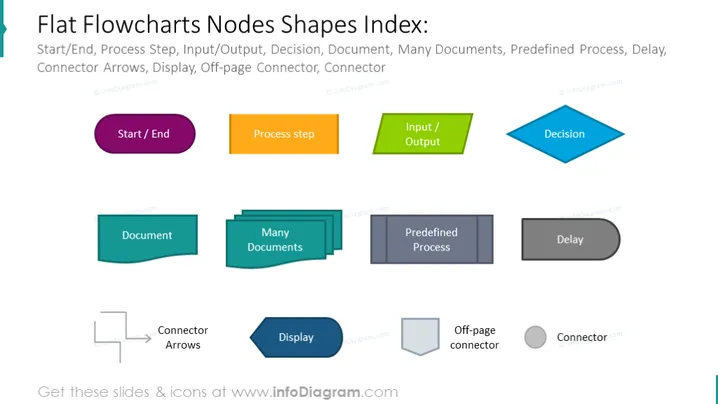
Flat Flowcharts Nodes Shapes Index
Slide Content:
This PowerPoint slide serves as an index for various flat design flowchart node shapes. It includes common flowchart elements such as 'Start/End', 'Process step', 'Input/Output', 'Decision', 'Document', 'Many Documents', 'Predefined Process', and 'Delay'. Additionally, it features 'Connector Arrows', 'Display', 'Off-page Connector', and 'Connector'. Each term corresponds to a specific shape used in flowcharts to represent different types of actions or steps within a process, helping to standardize the visual representation of workflows or systems.
Graphical Look:
- Each flowchart shape is flat with a solid fill and a simple outline, giving a clean and modern appearance.
- The shapes are colored differently: purple for 'Start/End', orange for 'Process step', green for 'Input/Output', blue for 'Decision', teal for 'Document', and darker shades for 'Predefined Process' and 'Delay'.
- Icons are minimalistic, with a hand-drawn aesthetic for the 'Connector Arrows' and geometric shapes for the others.
- The layout is grid-like, with each flowchart element given its own space for clarity.
- Arrows are used to denote the direction of the process or the use of connectors in a flowchart.
The slide has a modern and clean design, using a grid layout to organize a variety of flat, colorful icons representing different flowchart elements. The design is consistent and uncluttered, making it easy to identify and understand each element at a glance.
Use Cases:
- In an instructional presentation explaining how to create flowcharts.
- During a project planning meeting to agree on standard symbols for process mapping.
- In a training module for new employees on understanding company workflows.
- As part of a documentation template for process design and analysis.
How to Edit
How to edit text & colors

How to expand / shorten diagram

How to Replace Icons in infoDiagram PPT


