
Reviews
Sus gráficos añaden un toque agradable a mis presentaciones y recientemente los usé para una de mis reuniones generales. Su conjunto de herramientas añade profesionalismo a mis diapositivas. En lugar de usar imágenes prediseñadas estándar.
Necesitaba un aspecto fresco para algunas de mis diapositivas. Había intentado encontrar una forma de crear un efecto de pincel, de subrayar, acentuar, añadir algo de color y los marcadores escritos a mano fueron justo lo que necesitaba. Muy fácil de usar, fácil de ajustar el tamaño, cambiar el color. Fue una solución asequible y perfecta, y estoy feliz de recomendarla.
El aspecto nítido y limpio de los gráficos, y el hecho de que me permitiera editar y cambiar fácilmente los colores para que coincidieran con la plantilla fue mi principal razón para comprarlos.
Description
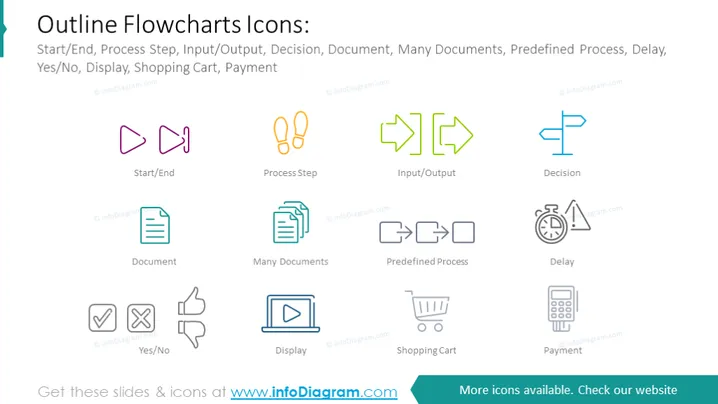
Outline Flowcharts Icons
Slide Content:
The slide is a compilation of stylized outline icons for use in flowcharts, signifying various stages and actions within a process. Icons include 'Start/End', 'Process Step', 'Input/Output', 'Decision', 'Document', 'Many Documents', 'Predefined Process', 'Delay', 'Yes/No', 'Display', 'Shopping Cart', and 'Payment'. Each icon is designed to visually communicate a specific function or step in a process, such as beginning or ending a sequence, making a decision, handling documents, pausing for a delay, and more.
Graphical Look:
- The icons are outlined in a light color, creating a subtle and clean appearance against a white background.
- 'Start/End' is represented by two symmetrical megaphones facing opposite directions in purple.
- 'Process Step' is shown as two linked orange ovals, and 'Input/Output' as two green arrows pointing in opposite directions.
- 'Decision' is depicted by a blue diamond shape, while 'Document' and 'Many Documents' are shown as a teal page and a stack of pages, respectively.
- A gray square with rounded corners and an inner arrow symbolizes the 'Predefined Process', and a gray hourglass represents 'Delay'.
- 'Yes/No' is illustrated with a thumbs-up and thumbs-down icon, 'Display' with a monitor screen, 'Shopping Cart' with a cart outline, and 'Payment' with a calculator.
- The shapes are simple and geometric, with clean lines and no additional embellishments.
The slide has a modern and minimalist aesthetic, using a muted color palette and simple geometric outlines to represent different flowchart elements clearly and effectively.
Use Cases:
- As part of a training presentation for new employees learning about business process mapping.
- In a project management meeting to agree on visual standards for documenting workflows.
- Within a software development documentation guide to illustrate system architecture or user flows.
- For a business analyst's toolkit when creating process diagrams for improvement proposals.
How to Edit
How to edit text & colors

How to expand / shorten diagram

How to Replace Icons in infoDiagram PPT


