
Reviews
Your graphics add a nice touch to my presentations and I recently used them for one of my all-hands meetings. Your toolbox adds professionalism to my slides. Instead of using standard clipart.
I needed a fresh look at some of my slides. I've tried to find a way to create a paintbrush effect, to underline, accentuate, add some color and the handwritten markers were just the things. Very easy to use, easy to size, change the color. It was an affordable, perfect solution and I'm happy to recommend it.
The crisp, clean look of the graphics, and the fact that it allowed me to easily edit and change the colors to match the template was my main reason for purchasing them.
Description
Flat Flowcharts Icons
Slide Content:
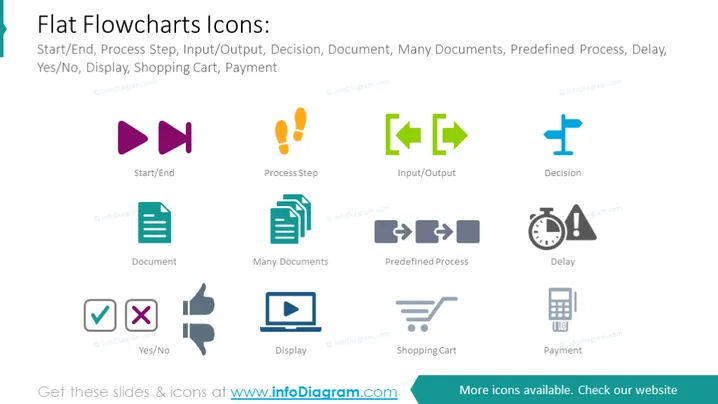
The slide displays a collection of flat design icons used in flowcharts, which include 'Start/End', 'Process Step', 'Input/Output', 'Decision', 'Document', 'Many Documents', 'Predefined Process', 'Delay', 'Yes/No', 'Display', 'Shopping Cart', and 'Payment'. Each icon is paired with a label that describes its function within a flowchart, such as indicating the beginning or end of a process, a step in the process, a point where a decision must be made, documents involved, and other operational or decision-making elements.
Graphical Look:
- The icons are simple, with a flat design and no gradients or shadows, emphasizing clarity and readability.
- A diverse color palette is used: purples, oranges, greens, blues, and grays.
- The 'Start/End' icons are represented by two purple megaphones facing opposite directions.
- 'Process Step' is depicted with two orange exclamation marks, 'Input/Output' with green arrows, and 'Decision' with a blue plus sign.
- 'Document' and 'Many Documents' are represented by single and stacked teal paper icons, respectively.
- The 'Predefined Process' is a pair of gray rectangles, and 'Delay' is shown as a clock.
- 'Yes/No' is illustrated by a green checkmark and red cross, 'Display' by a blue computer screen, 'Shopping Cart' by a gray cart, and 'Payment' by a calculator.
The slide is clean and organized, with a straightforward presentation of symbols. Each icon is distinct and recognizable, facilitating a quick understanding of their roles in a flowchart.
Use Cases:
- To educate team members on standard flowchart symbols during a training session.
- As a reference in documentation for software development or process engineering.
- Within a slide deck for a project kickoff meeting to establish common visual language.
- As part of an instructional guide for business analysis or operations management.
How to Edit
How to edit text & colors

How to expand / shorten diagram

How to Replace Icons in infoDiagram PPT


