

Your graphics add a nice touch to my presentations and I recently used them for one of my all-hands meetings. Your toolbox adds professionalism to my slides. Instead of using standard clipart.
Claude Jones, Director of Engineer, @Walmartlabs, USA

Your graphics add a nice touch to my presentations and I recently used them for one of my all-hands meetings. Your toolbox adds professionalism to my slides. Instead of using standard clipart.
Claude Jones, Director of Engineer, @Walmartlabs, USA
I needed a fresh look at some of my slides. I've tried to find a way to create a paintbrush effect, to underline, accentuate, add some color and the handwritten markers were just the things. Very easy to use, easy to size, change the color. It was an affordable, perfect solution and I'm happy to recommend it.
Anonymous, US
The crisp, clean look of the graphics, and the fact that it allowed me to easily edit and change the colors to match the template was my main reason for purchasing them.
Brandie Jenkins, E-learning Developer, USA
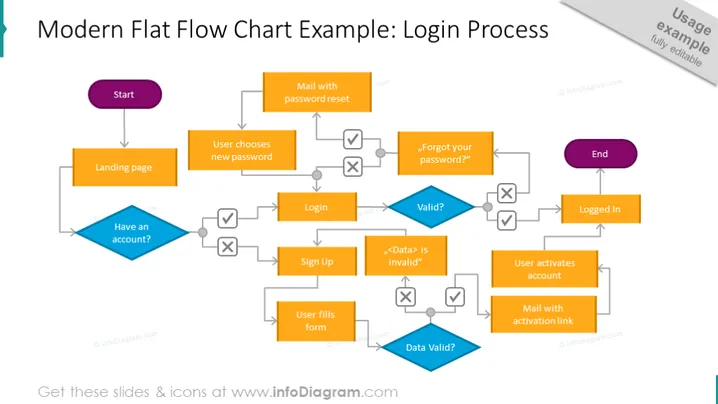
This infographic design slide example has a login process flowchart diagram, from start to end. Step 1 - landing page. If you have an account, the next step is to log in, then see if it's valid, if yes - the user is logged in; if not - check for a forgotten password, request a message with reset steps, then log in. If you don't have an account, you need to sign up. Fill out the form, data validation - if not valid, return to sign up, if valid, request an email with an activation link, then log in.
The flowchart example is very easy to follow and use. We've placed rectangular editable text blocks, and rhomboid text blocks for detrimental elements that either return you back or move you forward to the next step arrow-shaped line vectors, a cross icon for No, a checkmark icon for Yes, and a white background to emphasize the login process elements. This slide is part of the Flow Chart Diagram PPT Template PowerPoint Presentation.



