
Reviews
Your graphics add a nice touch to my presentations and I recently used them for one of my all-hands meetings. Your toolbox adds professionalism to my slides. Instead of using standard clipart.
I needed a fresh look at some of my slides. I've tried to find a way to create a paintbrush effect, to underline, accentuate, add some color and the handwritten markers were just the things. Very easy to use, easy to size, change the color. It was an affordable, perfect solution and I'm happy to recommend it.
The crisp, clean look of the graphics, and the fact that it allowed me to easily edit and change the colors to match the template was my main reason for purchasing them.
Description
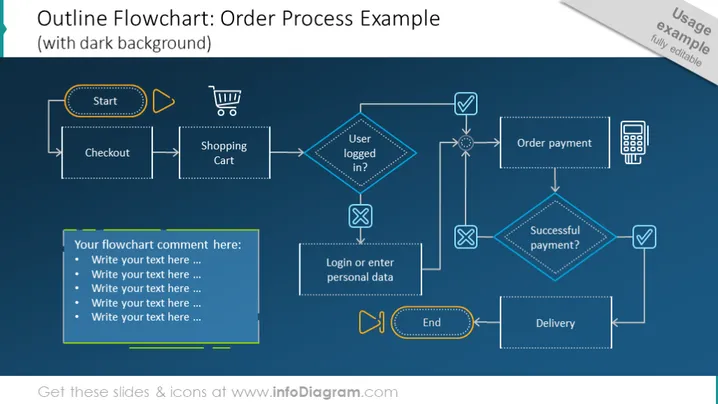
Outline Flowchart: Order Process Example
Slide Content:
The slide presents an order process flowchart for a shopping system, beginning with 'Start' and ending with 'End'. The process involves several steps such as 'Checkout', interacting with the 'Shopping Cart', and a decision point asking if the user is 'Logged in?'. If not, the process directs to 'Login or enter personal data'. Then it moves to 'Order payment', with a decision diamond questioning 'Successful payment?'. If successful, it proceeds to 'Delivery'; if not, presumably, it ends the transaction. Each step is a visual representation of a typical e-commerce transaction process.
Graphical Look:
- The slide background is dark, with a navy blue tone.
- Flowchart shapes include rectangles with dashed outlines, diamonds, and arrows, all in a neon outline style.
- Icons include a shopping cart, a check mark, and a calculator, all following the outline aesthetic.
- The colors of the flowchart elements are bright neon blue and yellow, creating a high contrast with the dark background.
- The flowchart is neatly organized from left to right, indicating the process flow.
The slide has a modern and sleek design with a tech-inspired neon color scheme that stands out against the dark background. The clear and logical layout of the flowchart provides an easy-to-follow visual guide for the order process.
Use Cases:
- In a business presentation to explain the online order process to new employees.
- During a project meeting to discuss and refine the e-commerce transaction flow.
- In a sales strategy session to demonstrate the customer journey from selection to delivery.
- As a part of a user experience (UX) design presentation, outlining the steps a user takes to complete a purchase online.
How to Edit
How to edit text & colors

How to expand / shorten diagram

How to Replace Icons in infoDiagram PPT


