
Reviews
Ihre Grafiken verleihen meinen Präsentationen eine nette Note, und ich habe sie kürzlich für eines meiner All-Hands-Meetings verwendet. Ihre Toolbox verleiht meinen Folien Professionalität, anstatt Standard-Clipart zu verwenden.
Ich brauchte einen neuen Blick auf einige meiner Folien. Ich habe versucht, einen Weg zu finden, einen Pinselschlag-Effekt zu erzielen, um zu unterstreichen, hervorzuheben, Farbe hinzuzufügen, und die handgeschriebenen Markierungen waren genau das Richtige. Sehr einfach zu bedienen, leicht in der Größe zu ändern, die Farbe zu ändern. Es war eine erschwingliche, perfekte Lösung und ich empfehle sie gerne weiter.
Die klare, saubere Optik der Grafiken und die Tatsache, dass ich die Farben leicht bearbeiten und an die Vorlage anpassen konnte, war mein Hauptgrund für den Kauf.
Description
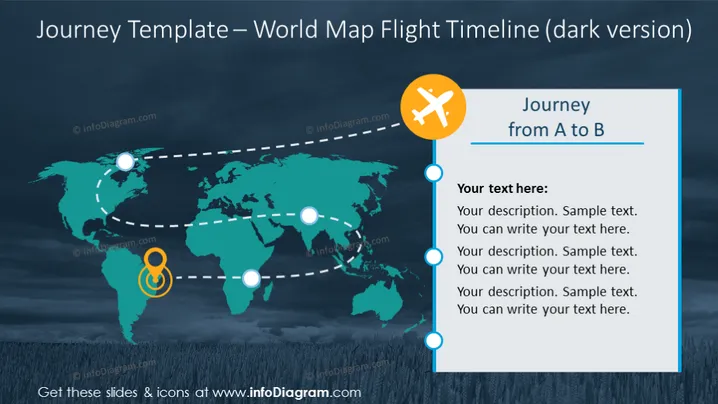
Journey Template – World Map Flight Timeline (dark version)
Slide Content
The slide contains a visual representation of a journey from point A to B, depicted as a dotted flight path across a world map. The layout includes placeholders for text, where a presenter can describe each stage of the journey. Each point on the flight path is marked by a circle, suggesting a sequence or steps in the journey that can be individually explained.
Graphical Look
- A dark blue gradient background that suggests a night-time or early dawn setting.
- A central, stylized world map in a lighter blue, easily discernible against the background.
- Dotted white lines creating a trajectory across the map, implying a flight path.
- White circular nodes that punctuate the path, possibly signifying different stops or key points.
- An orange circle with a figure-eight or infinity symbol, potentially highlighting a significant step on the journey.
- An airplane icon within a larger orange circle located near the title, reinforcing the flight or journey theme.
- A text box with a white background on the right side, outlined by a thin blue border that matches the color scheme.
- Four textual placeholders, aligned vertically, each introduced by a smaller blue circle, coordinating with the map's nodes.
The slide is well-organized and follows a cohesive color scheme that supports the theme of travel or progression. The use of icons, circles, and dotted lines serves to create a narrative flow, guiding the viewer's eye across the slide.
Use Cases
- Presenting a company's international expansion strategy by mapping out future market entries.
- Detailing the itinerary of an upcoming corporate event or business trip to stakeholders.
- Visualizing a product's journey from development to market within a global supply chain.
- Illustrating the timeline of a project's milestones with an international or geographical context.
How to Edit
How to edit text & colors

How to expand / shorten diagram

How to Replace Icons in infoDiagram PPT


