
Reviews
Sus gráficos añaden un toque agradable a mis presentaciones y recientemente los usé para una de mis reuniones generales. Su conjunto de herramientas añade profesionalismo a mis diapositivas. En lugar de usar imágenes prediseñadas estándar.
Necesitaba un aspecto fresco para algunas de mis diapositivas. Había intentado encontrar una forma de crear un efecto de pincel, de subrayar, acentuar, añadir algo de color y los marcadores escritos a mano fueron justo lo que necesitaba. Muy fácil de usar, fácil de ajustar el tamaño, cambiar el color. Fue una solución asequible y perfecta, y estoy feliz de recomendarla.
El aspecto nítido y limpio de los gráficos, y el hecho de que me permitiera editar y cambiar fácilmente los colores para que coincidieran con la plantilla fue mi principal razón para comprarlos.
Description
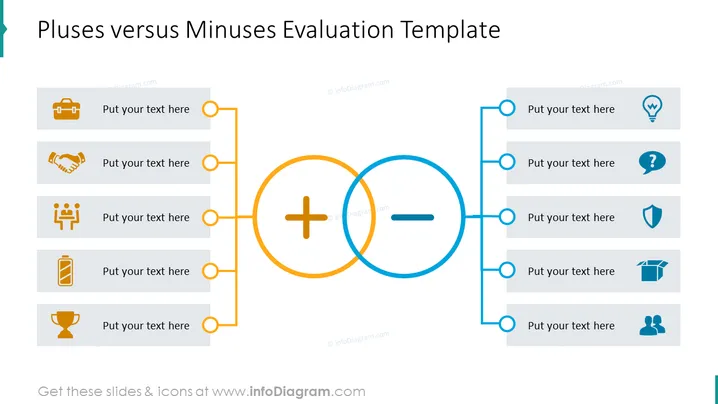
Pluses versus Minuses Evaluation Template
Slide Content
The PowerPoint slide titled "Pluses versus Minuses Evaluation Template" is designed to help presenters compare advantages and disadvantages within a specific context. The left side, representing pluses, contains four gray rectangles connected by an orange line, each featuring an icon and placeholder text for details. These include a briefcase, handshake, group of people, and a battery, likely symbolizing business strength, partnership, teamwork, and energy respectively. The right side, representing minuses, mirrors the left with a blue line connecting similar rectangles containing an idea bulb, question mark, shield, and box icons, probably representing ideas, questions, protection, and packaging.
Graphical Look
- The title is at the top center in bold, large font.
- Two large circles overlap in the center of the slide, reminiscent of a Venn diagram, with a plus sign in the orange circle and a minus sign in the blue circle.
- On the left side, four gray rectangular shapes with rounded corners are aligned vertically, each containing a unique icon and text placeholder.
- An orange line connects the circles on the left side, branching off into smaller lines leading to each gray rectangle.
- On the right side, the structure mirrors the left, with four gray rectangles connected by a blue line and each featuring different icons and text placeholders.
- Each rectangle contains a colored icon that corresponds to the side's color theme—orange for pluses and blue for minuses.
- The slide has a flat design with simple two-dimensional icons and minimal shadows or highlights.
The overall look of the slide is clean and modern, using a balanced color scheme to visually segregate the pluses and minuses. The use of icons and connected lines creates an organized and easy-to-understand comparison format.
Use Cases
- Conducting a SWOT analysis in business meetings, particularly focusing on the strengths (pluses) and weaknesses (minuses) aspects.
- Comparing product features or options during a marketing presentation, with clear visualization of benefits and potential drawbacks.
- Decision-making presentations where pros and cons need to be discussed before reaching a conclusion.
- Project debrief sessions where the team reviews what worked well and what aspects of the project could have been improved.
How to Edit
How to edit text & colors

How to expand / shorten diagram

How to Replace Icons in infoDiagram PPT


