
Reviews
Sus gráficos añaden un toque agradable a mis presentaciones y recientemente los usé para una de mis reuniones generales. Su conjunto de herramientas añade profesionalismo a mis diapositivas. En lugar de usar imágenes prediseñadas estándar.
Necesitaba un aspecto fresco para algunas de mis diapositivas. Había intentado encontrar una forma de crear un efecto de pincel, de subrayar, acentuar, añadir algo de color y los marcadores escritos a mano fueron justo lo que necesitaba. Muy fácil de usar, fácil de ajustar el tamaño, cambiar el color. Fue una solución asequible y perfecta, y estoy feliz de recomendarla.
El aspecto nítido y limpio de los gráficos, y el hecho de que me permitiera editar y cambiar fácilmente los colores para que coincidieran con la plantilla fue mi principal razón para comprarlos.
Description
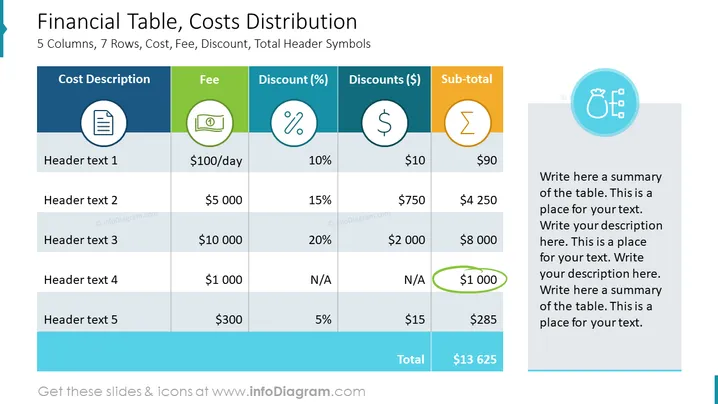
Financial Table, Costs Distribution
Slide Content
The slide shows a financial table that outlines cost distribution across five columns, labeled with cost descriptions, fees, discounts in percentages and dollars, and a sub-total for each item. There are five rows for different cost items, each detailed with header texts (1-5), with an additional row at the bottom displaying the total. For instance, "Header text 1" indicates a daily fee of $100 with a 10% discount, leading to a sub-total of $90, and "Header text 4" reflects a fee of $1,000 with no applicable discounts, totaling the same amount. The table is designed to present a clear summary of fees and discounts applied to various costs, culminating in a grand total.
Graphical Look
- The title of the slide is in a large, bold font centered at the top.
- There's a colorful header row with icons representing cost, fee, discount percentage, discount in dollars, and sub-total.
- Rows of the table alternate in shading between light gray and white for visual distinction.
- Each cell in the header row has a distinct background color and a centered icon relevant to the column's content.
- The cost description column has document icons, fee column shows currency icons, discount percentage has icons featuring a percentage sign, and the sub-total features summation icons.
- A text placeholder with a circular icon is situated to the right for summarizing table content.
- A thick blue horizontal line defines the bottom border of the slide, adding to the overall design.
- The total row is emphasized with bolder, larger font and a green-colored highlight at the grand total.
The slide uses a mix of colors, icons, and alternating row shadings to create an easy-to-follow financial overview. Textual information is supported by visual cues that make the content more engaging and accessible.
Use Cases
- Presenting a financial breakdown during budget meetings to outline expenses and discounts.
- Illustrating cost structure and individual item costs in project proposals or business plans.
- Summarizing expenses and savings for stakeholders in financial reports.
- Demonstrating pricing strategies and the impact of discounts on total costs for sales presentations.
How to Edit
How to edit text & colors

How to expand / shorten diagram

How to Replace Icons in infoDiagram PPT


