

Your graphics add a nice touch to my presentations and I recently used them for one of my all-hands meetings. Your toolbox adds professionalism to my slides. Instead of using standard clipart.
Claude Jones, Director of Engineer, @Walmartlabs, USA

Your graphics add a nice touch to my presentations and I recently used them for one of my all-hands meetings. Your toolbox adds professionalism to my slides. Instead of using standard clipart.
Claude Jones, Director of Engineer, @Walmartlabs, USA
I needed a fresh look at some of my slides. I've tried to find a way to create a paintbrush effect, to underline, accentuate, add some color and the handwritten markers were just the things. Very easy to use, easy to size, change the color. It was an affordable, perfect solution and I'm happy to recommend it.
Anonymous, US
The crisp, clean look of the graphics, and the fact that it allowed me to easily edit and change the colors to match the template was my main reason for purchasing them.
Brandie Jenkins, E-learning Developer, USA
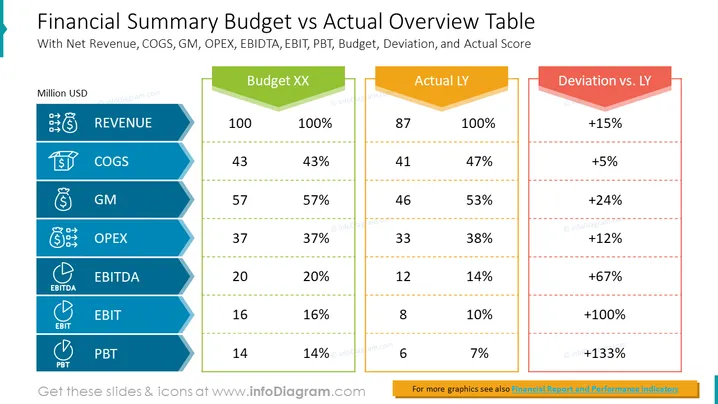
The Financial Summary Budget vs Actual Overview Table slide provides a high-level overview of a company's financial performance, comparing its budget to its actual results. The slide includes key financial metrics such as net revenue, COGS, gross margin, operating expenses, EBITDA, EBIT, and PBT. The slide also includes a deviation column, which shows the difference between the budget and actual amounts, and an actual score column, which shows the actual amount divided by the budget amount. Metrics included in the table:
Overall, the slide shows that the company is performing well, with actual results exceeding budget in all key financial metrics. The company's net revenue and gross margin are both up over the prior year, and its EBITDA, EBIT, and PBT have all more than doubled.
Here are some examples of where you can use a financial summary budget vs an actual overview table slide in business presentations:



