
Reviews
Ihre Grafiken verleihen meinen Präsentationen eine nette Note, und ich habe sie kürzlich für eines meiner All-Hands-Meetings verwendet. Ihre Toolbox verleiht meinen Folien Professionalität, anstatt Standard-Clipart zu verwenden.
Ich brauchte einen neuen Blick auf einige meiner Folien. Ich habe versucht, einen Weg zu finden, einen Pinselschlag-Effekt zu erzielen, um zu unterstreichen, hervorzuheben, Farbe hinzuzufügen, und die handgeschriebenen Markierungen waren genau das Richtige. Sehr einfach zu bedienen, leicht in der Größe zu ändern, die Farbe zu ändern. Es war eine erschwingliche, perfekte Lösung und ich empfehle sie gerne weiter.
Die klare, saubere Optik der Grafiken und die Tatsache, dass ich die Farben leicht bearbeiten und an die Vorlage anpassen konnte, war mein Hauptgrund für den Kauf.
Description
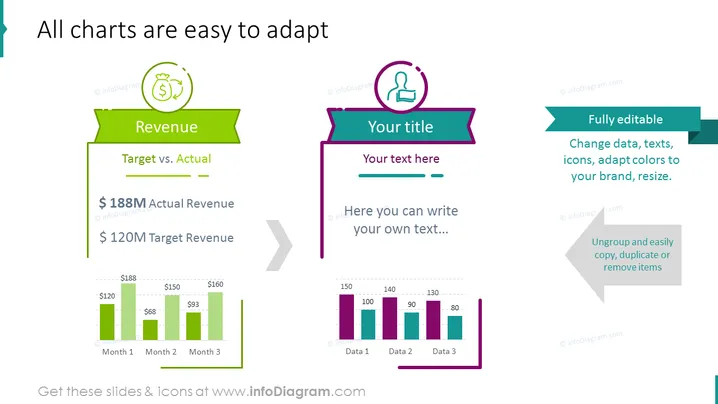
All charts are easy to adapt
Slide Content
This PowerPoint slide introduces the concept of adaptable charts with examples displaying "Revenue" comparison between target and actual figures, along with a placeholder section for "Your title" and custom text. The Revenue section shows a bar chart comparing monthly target revenue against actual revenue, indicating an outperformance with $188M in actual revenue over a $120M target. The other side suggests customizability and is meant for user input.
Graphical Look
- The slide has a white background with two dominant content blocks separated by a large grey arrow pointing right.
- The left block features a green ribbon banner with the title "Revenue" and a bar graph beneath it.
- The bar graph has three pairs of green bars representing "Month 1", "Month 2", and "Month 3".
- Above the banner, there is a circular icon with a dollar sign, signifying the financial theme.
- The right block contains a teal banner for inserting the user's title and below that a pink placeholder box for additional text.
- Above the banner, there is a purple circular icon with a person silhouette, suggesting a user or personalized section.
- On the far right, there is another ribbon banner in green with text talking about the editability of the slide, complemented by a grey arrow pointing left.
The slide is visually balanced, with vibrant colors and clearly demarcated sections for financial data and user customization. Icons and banners are used to create a visual hierarchy and draw attention to key areas of the slide.
Use Cases
- Presenting financial reports to highlight budget performance against projections.
- Business meetings where customized data presentation is required.
- Workshops or training sessions teaching how to modify and use adaptable charts.
- Sales pitches where data customization might offer a more persuasive visual argument.
How to Edit
How to edit text & colors

How to expand / shorten diagram

How to Replace Icons in infoDiagram PPT


