

Your graphics add a nice touch to my presentations and I recently used them for one of my all-hands meetings. Your toolbox adds professionalism to my slides. Instead of using standard clipart.
Claude Jones, Director of Engineer, @Walmartlabs, USA

Your graphics add a nice touch to my presentations and I recently used them for one of my all-hands meetings. Your toolbox adds professionalism to my slides. Instead of using standard clipart.
Claude Jones, Director of Engineer, @Walmartlabs, USA
I needed a fresh look at some of my slides. I've tried to find a way to create a paintbrush effect, to underline, accentuate, add some color and the handwritten markers were just the things. Very easy to use, easy to size, change the color. It was an affordable, perfect solution and I'm happy to recommend it.
Anonymous, US
The crisp, clean look of the graphics, and the fact that it allowed me to easily edit and change the colors to match the template was my main reason for purchasing them.
Brandie Jenkins, E-learning Developer, USA
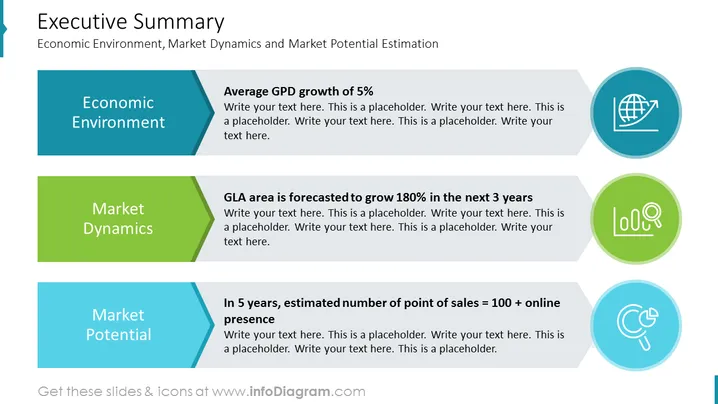
The PowerPoint slide titled "Executive Summary" covers the Economic Environment, Market Dynamics, and Market Potential Estimation. It comprises three sections: "Economic Environment," highlighting an average GDP growth of 5%, which indicates stability or growth in the economic setting; "Market Dynamics," with a notable point about the GLA area projected to grow 180% in the next 3 years, signifying rapid expansion in a particular zone; and "Market Potential," positing that in 5 years, the estimated number of point of sales will be over 100 plus online presence, suggesting a forecast of physical and digital market reach.
The overall look of the slide is clean and professional, with a structured layout that visually segments information for clear communication. The use of color-coding and icons helps to distinguish the topics at a glance.



