
Reviews
Your graphics add a nice touch to my presentations and I recently used them for one of my all-hands meetings. Your toolbox adds professionalism to my slides. Instead of using standard clipart.
I needed a fresh look at some of my slides. I've tried to find a way to create a paintbrush effect, to underline, accentuate, add some color and the handwritten markers were just the things. Very easy to use, easy to size, change the color. It was an affordable, perfect solution and I'm happy to recommend it.
The crisp, clean look of the graphics, and the fact that it allowed me to easily edit and change the colors to match the template was my main reason for purchasing them.
Description
Executive and Management Human Resources Roles List
Slide Content
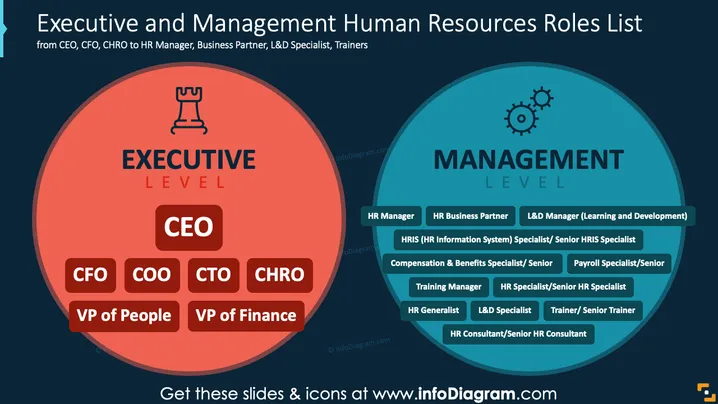
This slide outlines human resources roles, divided into executive and management levels. The Executive level includes roles like CEO, CFO, COO, CTO, CHRO, VP of People, and VP of Finance, highlighting leadership and strategic decision-making positions. The Management level encompasses roles like HR Manager, HR Business Partner, L&D Manager, HRIS Specialist, Compensation Specialist, Payroll Specialist, Training Manager, HR Specialist, HR Generalist, L&D Specialist, Trainer, and HR Consultant, focusing on operational HR functions.
Graphical Look
- The slide features two large circles, each representing a level; the left is red for Executive, and the right is blue for Management.
- The Executive circle has an icon of a chess piece, symbolizing strategic leadership.
- The Management circle includes gear icons to represent operational processes.
- The circles have outer lines and contain boxes with rounded corners for each role, the Executive in red, and the Management in blue, enhancing clarity.
- The background is dark blue, providing contrast and emphasizing content.
This slide effectively distinguishes between executive and management levels within HR roles through distinct colors and shapes. It clearly contrasts strategic and operational roles.
Use Cases
- Presenting HR role structures in organizational overview meetings.
- Illustrating HR career path options in training workshops.
- Structuring HR team functions during business strategy sessions.
- Educating new employees during corporate onboarding about HR hierarchy.
How to Edit
How to edit text & colors

How to expand / shorten diagram

How to Replace Icons in infoDiagram PPT


