
Reviews
Your graphics add a nice touch to my presentations and I recently used them for one of my all-hands meetings. Your toolbox adds professionalism to my slides. Instead of using standard clipart.
I needed a fresh look at some of my slides. I've tried to find a way to create a paintbrush effect, to underline, accentuate, add some color and the handwritten markers were just the things. Very easy to use, easy to size, change the color. It was an affordable, perfect solution and I'm happy to recommend it.
The crisp, clean look of the graphics, and the fact that it allowed me to easily edit and change the colors to match the template was my main reason for purchasing them.
Description
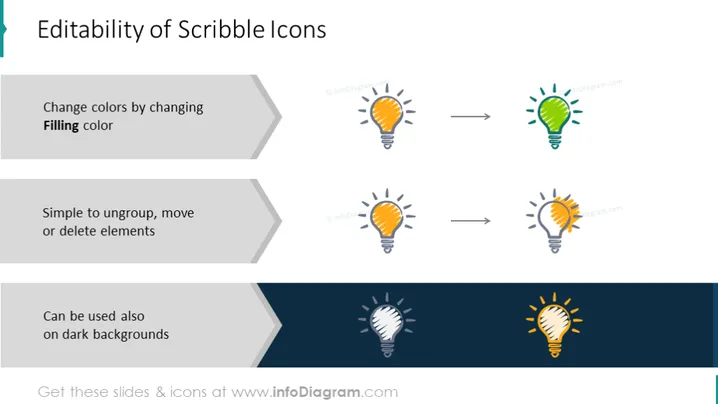
Editability of Scribble Icons
Slide Content
The slide presents features of "Scribble Icons" with three main points of editability. First, it shows you can change the colors of the icons by altering the "Filling color," implying that the icon colors are customizable. Next, it states icons are "Simple to ungroup, move or delete elements," suggesting they are easy to manipulate within a presentation. Lastly, it claims icons can be "Used also on dark backgrounds," indicating versatility in various design layouts.
Graphical Look
- The title "Editability of Scribble Icons" is in large, bold font at the top.
- Below the title, three gray arrow shapes point to the right, each with a different editability feature written in black text.
- To the right of each arrow, before and after icon states are displayed, showcasing the customization effects.
- Each before and after pair of icons is linked by a smaller gray arrow, indicating the change process.
- The icons themselves are lightbulb scribbles, shown in a default state and then altered to demonstrate the described feature. The color changes are displayed using a green lightbulb icon and a multi-colored lightbulb icon.
- The bottom gray arrow showcases icon visibility on a dark background through a lightbulb icon shifting from white to yellow.
The slide has a clean, modern aesthetic with an easy-to-follow layout. The use of consistent icons helps to visually communicate the editability features being discussed.
Use Cases
- Demonstrating the flexibility of graphic assets in a branding or marketing presentation.
- Teaching how to customize visuals in a training session on presentation design.
- Highlighting the adaptability of visual elements in a web design portfolio.
- Showcasing product features in a sales pitch for presentation or design software.
How to Edit
How to edit text & colors

How to expand / shorten diagram

How to Replace Icons in infoDiagram PPT


