Reviews
Sus gráficos añaden un toque agradable a mis presentaciones y recientemente los usé para una de mis reuniones generales. Su conjunto de herramientas añade profesionalismo a mis diapositivas. En lugar de usar imágenes prediseñadas estándar.
Necesitaba un aspecto fresco para algunas de mis diapositivas. Había intentado encontrar una forma de crear un efecto de pincel, de subrayar, acentuar, añadir algo de color y los marcadores escritos a mano fueron justo lo que necesitaba. Muy fácil de usar, fácil de ajustar el tamaño, cambiar el color. Fue una solución asequible y perfecta, y estoy feliz de recomendarla.
El aspecto nítido y limpio de los gráficos, y el hecho de que me permitiera editar y cambiar fácilmente los colores para que coincidieran con la plantilla fue mi principal razón para comprarlos.
Description
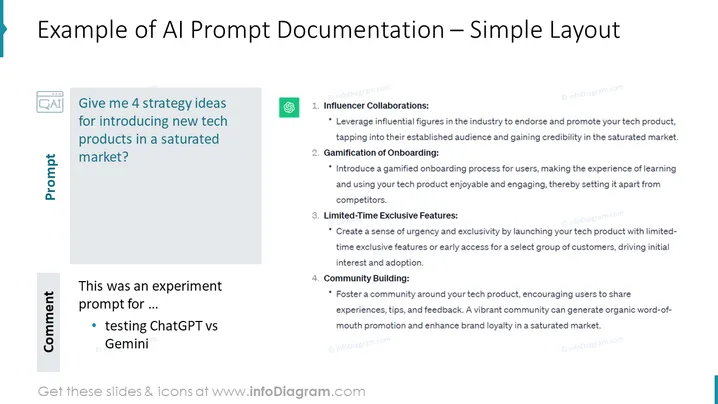
Example of AI Prompt Documentation – Simple Layout
Slide Content
The slide presents a structured approach for launching tech products in a competitive market, emphasizing the use of AI prompts. The key strategies include:
- Influencer Collaborations: Utilizing industry influencers to gain audience and credibility.
- Gamification of Onboarding: Making the learning process fun to differentiate from competitors.
- Limited-Time Exclusive Features: Offering early access to create urgency and drive initial adoption.
- Community Building: Establishing a community for sharing experiences and fostering brand loyalty.
Graphical Look
- The slide features a clean, minimalist design with a white background.
- A dark blue, left-aligned header provides the main title with a lighter blue horizontal line underneath.
- Two content boxes, shaded in light blue and gray, contain main points and sub-points.
- Each content box is labeled with a larger, bold title "Prompt" and "Comment" respectively.
- Icons are presented next to the headers of each box, with a stylized "Q&A" icon for the prompt and a speech bubble for the comment.
- Bullet points are used to list the key strategies and details beneath each of the two main headers.
- Both content boxes have small copyright symbols and associated email addresses.
The overall look of the slide is professional and straightforward, allowing for the content to be easily read and understood. The use of bolding, bullet points, and icons aids in the clear presentation of information.

Use Cases
- Ideal for a business strategy meeting where approaches to enter a saturated market are discussed.
- Useful for marketing team workshops focused on planning and executing product launches.
- Can serve as an educational tool in seminars or webinars that teach market entry strategies.
- Applicable for venture capital or investor presentations to showcase a go-to-market strategy for tech products.
How to Edit
How to edit text & colors

How to expand / shorten diagram

How to Replace Icons in infoDiagram PPT


