
Reviews
Ihre Grafiken verleihen meinen Präsentationen eine nette Note, und ich habe sie kürzlich für eines meiner All-Hands-Meetings verwendet. Ihre Toolbox verleiht meinen Folien Professionalität, anstatt Standard-Clipart zu verwenden.
Ich brauchte einen neuen Blick auf einige meiner Folien. Ich habe versucht, einen Weg zu finden, einen Pinselschlag-Effekt zu erzielen, um zu unterstreichen, hervorzuheben, Farbe hinzuzufügen, und die handgeschriebenen Markierungen waren genau das Richtige. Sehr einfach zu bedienen, leicht in der Größe zu ändern, die Farbe zu ändern. Es war eine erschwingliche, perfekte Lösung und ich empfehle sie gerne weiter.
Die klare, saubere Optik der Grafiken und die Tatsache, dass ich die Farben leicht bearbeiten und an die Vorlage anpassen konnte, war mein Hauptgrund für den Kauf.
Description
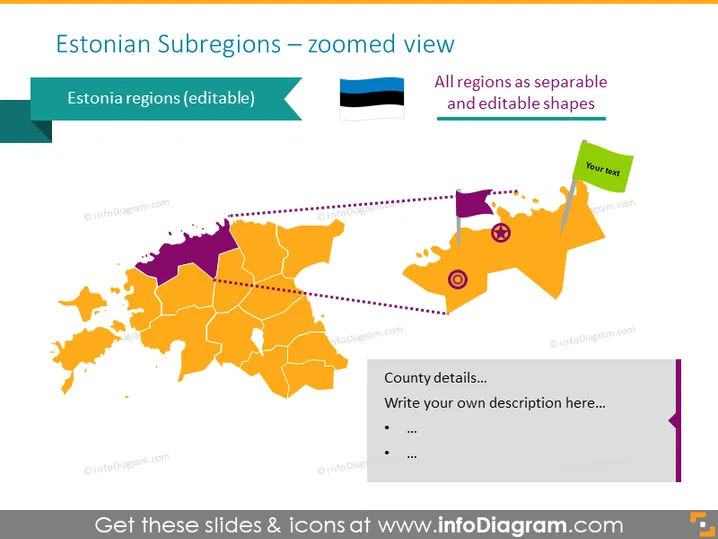
Estonian Subregions – zoomed view
Slide Content
The slide showcases a detailed map focusing on the subregions of Estonia, emphasizing that each region is an editable shape. A close-up view of the Estonian map highlights specific areas with a dotted line indicating a zoomed segment. It is labeled with the text "All regions as separate and editable shapes," suggesting customizability of the map for presentations. Additionally, there is a place for "County details…" where presenters can write their own descriptions, bullet points, or additional information to tailor the content to their needs.
Graphical Look
- A large, orange-to-purple gradient map of Estonia occupying most of the slide, with the regions demarcated by white outlines.
- A zoomed-in segment on the right side of the slide associated with the main map by a dotted line.
- Two text boxes, one on the left with "Estonia regions (editable)" next to a flag of Estonia, and one on the right within the zoomed-in area labeled "Your text."
- An area at the bottom right with the title "County details…" followed by placeholder text and bullet points.
- A location pin icon and a prohibition sign icon on the zoomed-in area of the map.
The overall look is clean and modern, with a visually appealing color gradient that helps differentiate the regions. Icons and text boxes are employed to designate areas where additional details can be added.
Use Cases
- To present data or analysis on a regional level within Estonia, such as economic statistics, demographic information, or election results.
- In educational settings, to teach geography or history related to Estonian regions.
- For business strategy presentations, to outline market penetration, regional sales distribution, or logistical planning in Estonia.
- Within travel and tourism presentations, to highlight points of interest, travel routes, or destination information.
How to Edit
How to edit text & colors

How to expand / shorten diagram

How to Replace Icons in infoDiagram PPT


