
Reviews
Ihre Grafiken verleihen meinen Präsentationen eine nette Note, und ich habe sie kürzlich für eines meiner All-Hands-Meetings verwendet. Ihre Toolbox verleiht meinen Folien Professionalität, anstatt Standard-Clipart zu verwenden.
Ich brauchte einen neuen Blick auf einige meiner Folien. Ich habe versucht, einen Weg zu finden, einen Pinselschlag-Effekt zu erzielen, um zu unterstreichen, hervorzuheben, Farbe hinzuzufügen, und die handgeschriebenen Markierungen waren genau das Richtige. Sehr einfach zu bedienen, leicht in der Größe zu ändern, die Farbe zu ändern. Es war eine erschwingliche, perfekte Lösung und ich empfehle sie gerne weiter.
Die klare, saubere Optik der Grafiken und die Tatsache, dass ich die Farben leicht bearbeiten und an die Vorlage anpassen konnte, war mein Hauptgrund für den Kauf.
Description
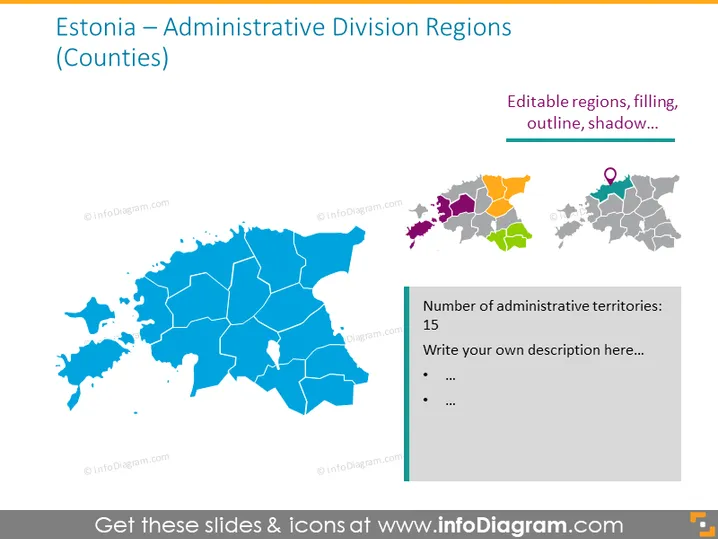
Estonia — Administrative Division Regions (Counties)
Slide Content
The slide presents information about Estonia's administrative division into counties. It shows a map with the geographical layout of the regions and highlights that there are editable regions, indicating the possibility to customize the map's appearance with different colors, outlines, or shadows. Though specific administrative details are not given, a side note mentions the number of administrative territories, which is 15, inviting the user to add a descriptive text. This setup is excellent for an audience seeking customization options for visual representations of Estonia's administrative regions.
Graphical Look
- A large blue-colored map of Estonia dominates the left side of the slide, showcasing the country's administrative divisions.
- Each region in the map is bounded by white borders, providing clear separation and emphasizing divisibility.
- On the top right corner, there's a mini-map with color-coded regions, adjacent to a text box mentioning editable features like region filling, outline, and shadow.
- Below the mini-map, another map highlights a specific area with a location pin icon, illustrating the functionality to pinpoint locations.
- There's a rectangular text box aligned to the right with a green header, containing the text "Number of administrative territories: 15" followed by bullet points for additional descriptions.
- The overall color scheme includes shades of blue, gray, and muted colors for the mini-maps, with green accents for text boxes.
The slide is visually balanced, with a clear focus on the Estonian map and an uncluttered layout. The right side of the slide provides information on editable features with an example and space for additional notes, making it informative and interactive.
Use Cases
- Introducing Estonia's regional administrative structure in geographical or political presentations.
- Customizing specific regions for demographic or statistical presentations to highlight various data points like population density, economic status, or electoral results.
- Planning or reviewing regional development projects where visual representation of location-specific data is necessary.
- Educational purposes, where such as teaching students about Estonia's geography and governmental organization.
How to Edit
How to edit text & colors

How to expand / shorten diagram

How to Replace Icons in infoDiagram PPT


