

Your graphics add a nice touch to my presentations and I recently used them for one of my all-hands meetings. Your toolbox adds professionalism to my slides. Instead of using standard clipart.
Claude Jones, Director of Engineer, @Walmartlabs, USA

Your graphics add a nice touch to my presentations and I recently used them for one of my all-hands meetings. Your toolbox adds professionalism to my slides. Instead of using standard clipart.
Claude Jones, Director of Engineer, @Walmartlabs, USA
I needed a fresh look at some of my slides. I've tried to find a way to create a paintbrush effect, to underline, accentuate, add some color and the handwritten markers were just the things. Very easy to use, easy to size, change the color. It was an affordable, perfect solution and I'm happy to recommend it.
Anonymous, US
The crisp, clean look of the graphics, and the fact that it allowed me to easily edit and change the colors to match the template was my main reason for purchasing them.
Brandie Jenkins, E-learning Developer, USA
##Slide contents:
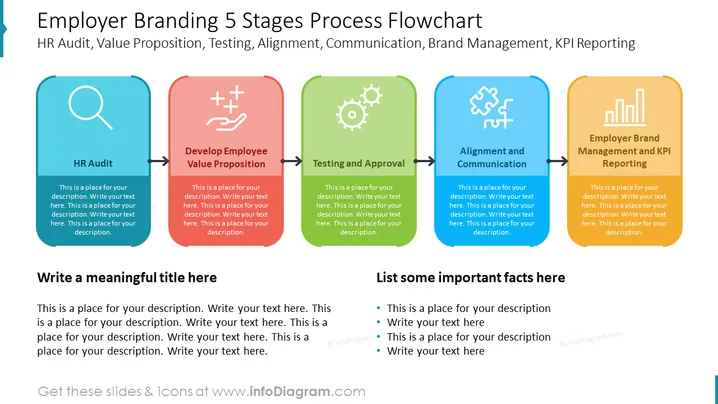
This PowerPoint template demonstrates the 5 steps of an Employer Branding Process Flowchart. The first step is the HR Audit which is an assessment of your company's HR policies and procedures. The second step is to develop an employee value proposition which is a way you can attract the best talent and best employees to work for your company. The third step is testing and approval where you examine your new employees to get them approved. The fourth step is alignment and communication where you communicate with your employees to keep them aligned with your company culture. The fifth step is employer brand management and KPI reporting where your employees create a KPI report to ease the analysis of the most important key performance indicators. You can use this slide if you are a human resource manager who has a job opening and wants to hire prospective employees in the recruitment process. At the bottom of the slide, you can the title of your presentation and some important facts for your potential candidates. You can download this employer branding strategy on Google Slides and Keynote.
##Slide Infographic Description:
White Background, Text Box, 5 Process Flowchart, Colorful Flowchart, Magnifier Icon, Research Icon, Audit Icon, Plus on Hand Icon, Value Icon, Benefits Icon, Employee Value Proposition Icon, Gears Icon, Testing Icon, Puzzle Pieces Icon, Alignment Icon



