
Reviews
Ihre Grafiken verleihen meinen Präsentationen eine nette Note, und ich habe sie kürzlich für eines meiner All-Hands-Meetings verwendet. Ihre Toolbox verleiht meinen Folien Professionalität, anstatt Standard-Clipart zu verwenden.
Ich brauchte einen neuen Blick auf einige meiner Folien. Ich habe versucht, einen Weg zu finden, einen Pinselschlag-Effekt zu erzielen, um zu unterstreichen, hervorzuheben, Farbe hinzuzufügen, und die handgeschriebenen Markierungen waren genau das Richtige. Sehr einfach zu bedienen, leicht in der Größe zu ändern, die Farbe zu ändern. Es war eine erschwingliche, perfekte Lösung und ich empfehle sie gerne weiter.
Die klare, saubere Optik der Grafiken und die Tatsache, dass ich die Farben leicht bearbeiten und an die Vorlage anpassen konnte, war mein Hauptgrund für den Kauf.
Description
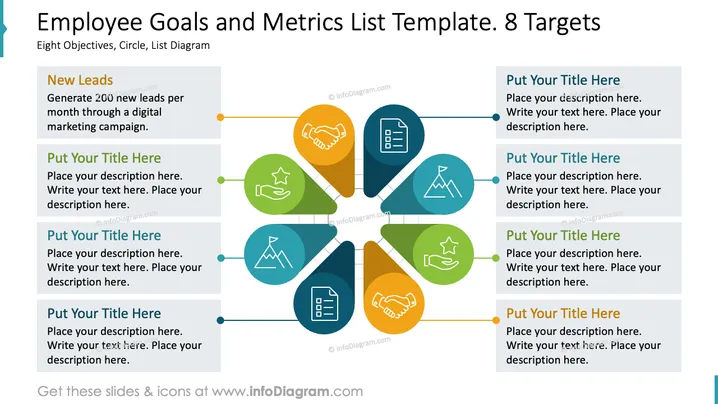
Employee Goals and Metrics List Template. 8 Targets
Slide Content
The slide is designed to outline eight separate goals or targets, each linked to a measurable metric. One example given is "New Leads," with the metric being the generation of 200 new leads per month through a digital marketing campaign. The other seven targets are left blank for the presenter to customize. The provision of example content and placeholders suggests the slide's focus on performance tracking and goal setting.
Graphical Look
- The slide has a central circular pattern with a line connecting eight surrounding colored teardrop shapes.
- Each teardrop shape contains an icon representative of a business or a goal metric.
- The main colors used in the teardrops' design are shades of blue, green, yellow, and orange, creating a vibrant appearance.
- Each teardrop is connected to a rectangular text box with a sample heading and space for further descriptions.
- There are connecting lines with nodes in varied colors that match the respective teardrop shapes, providing a visual link between text and graphics.
- The slide background is white, which accentuates the colored graphics.
The visual composition is balanced and provides a clear and engaging format for presenting information. The icons within the teardrops are simple but distinct, facilitating quick understanding.
Use Cases
- To present quarterly business objectives during a company meeting, with specific focus areas highlighted graphically.
- For use in strategy development workshops, where teams are identifying and mapping out key performance indicators (KPIs).
- To track progress on various projects or performance metrics during a performance review or update presentation.
- As a template during sales team briefings to set and review targets for lead generation and customer engagement.
How to Edit
How to edit text & colors

How to expand / shorten diagram

How to Replace Icons in infoDiagram PPT


