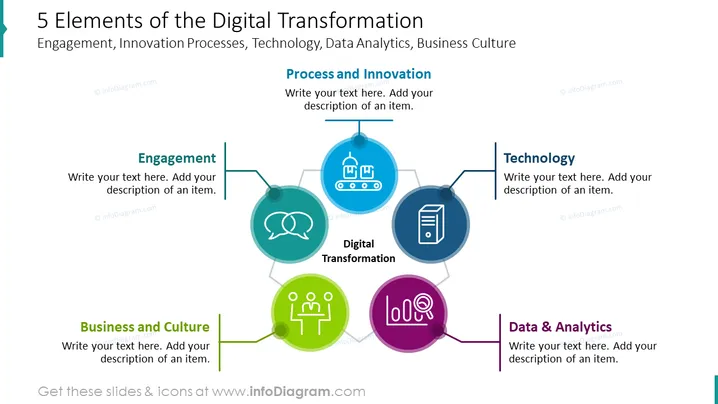
This PowerPoint slide contains a diagram showing the 5 elements of digital transformation. Using a template or infographics such as this enables you to save time on your digitization presentation, cut down on unnecessary content by using visuals, and engage your audience.
You could use this to help come up with a digital transformation strategy, use it to complement a transformation roadmap, calculate different ways to achieve digital transformation, account for potential barriers to digital transformation, look at how the customer experience will be affected, present to clients, layout the task distribution for a successful DT, see to the governance of the digital technology and the upgrading or implementation into existing business processes, look at the capability of your teams to be able to deliver on DT goals, analyse the requirements for a DT such as operational, intelligence, automation, executive, performance management, manpower, financial investment, or marketing; design strategic goals or a framework that are in line with your vision, etc.
All slides in this deck are fully editable, with icons coming in a vector graphic format. You can modify colors to match your organization colors, add your own text & data (e.g. mention managers, innovation, costs), resize shapes (images will stay high-quality), add shadows and other effects to the core elements, or download from PowerPoint into a PDF format, for example.
##Slide contents:
Elements of Digital Transformation PPT, Vector Graphic Illustrations, DT Elements Diagram, Textboxes, Placeholder Text, Line Graphics, Circle Graphics, People Icon, Speech Bubble Icon, Production Line Icon, PC Tower Icon, Graph Icon, Resizable Shapes, White Background