
Reviews
Ihre Grafiken verleihen meinen Präsentationen eine nette Note, und ich habe sie kürzlich für eines meiner All-Hands-Meetings verwendet. Ihre Toolbox verleiht meinen Folien Professionalität, anstatt Standard-Clipart zu verwenden.
Ich brauchte einen neuen Blick auf einige meiner Folien. Ich habe versucht, einen Weg zu finden, einen Pinselschlag-Effekt zu erzielen, um zu unterstreichen, hervorzuheben, Farbe hinzuzufügen, und die handgeschriebenen Markierungen waren genau das Richtige. Sehr einfach zu bedienen, leicht in der Größe zu ändern, die Farbe zu ändern. Es war eine erschwingliche, perfekte Lösung und ich empfehle sie gerne weiter.
Die klare, saubere Optik der Grafiken und die Tatsache, dass ich die Farben leicht bearbeiten und an die Vorlage anpassen konnte, war mein Hauptgrund für den Kauf.
Description
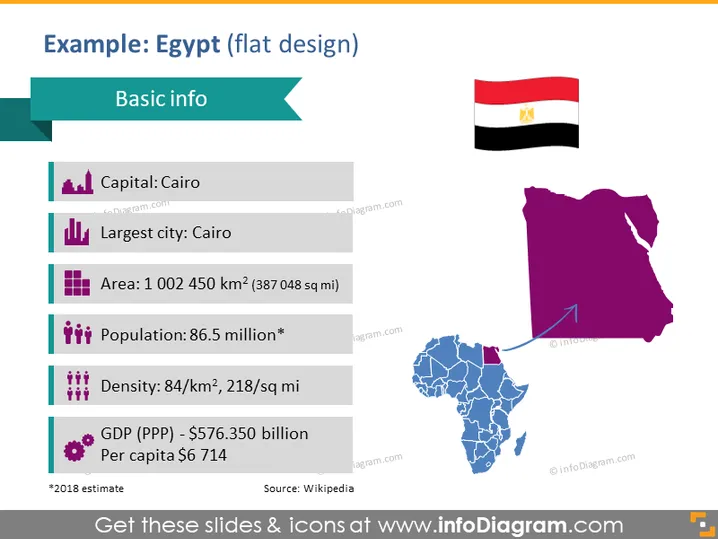
Example: Egypt (flat design)
Slide Content
This slide contains basic information about Egypt, formatted in a clear and concise way. The capital is listed as Cairo, which is also the largest city. The area is significant, over one million square kilometers, which places Egypt as a large country geographically. A substantial population of 86.5 million indicates Egypt is populous, while the population density provides insight into how spread out the inhabitants might be. The GDP (PPP) is detailed, along with the per capita income, providing a snapshot of the country's economic standing. Lastly, the * indicates that the population figure is an estimate from 2018, and the source of the information is credited to Wikipedia.
Graphical Look
- The slide has a dark purple and teal color scheme with a light background.
- The title "Example: Egypt (flat design)" is in bold and set against a teal banner.
- A smaller teal banner labeled "Basic info" sits below the slide title.
- Five bullet points are aligned on the left with iconography: a building icon for the capital, bars for the largest city, a map icon for the area, a group of people icon for the population, and a currency icon for GDP.
- Each bullet point includes a light grey line to separate them visually.
- To the right, there's a stylized map of Africa in blue with Egypt highlighted in purple.
- Above the map, an Egyptian flag is displayed.
- A purple arrow connects the highlighted country on the map to the corresponding icon on the left.
- The visual elements are well-balanced, with text and icons on the left and graphical elements on the right.
The slide is visually appealing, with a modern, flat design that is professional and easy to read. The use of icons beside each bullet point creates a visually engaging way to represent data.
Use Cases
- In educational settings, to introduce students to key facts about Egypt.
- In business presentations, to provide an overview of the Egyptian market or demographics during international expansion discussions.
- During economic or geopolitical analyses in conferences or seminars, highlighting Egypt's economic and geographical statistics.
- In travel or tourism industry meetings, to showcase Egypt's highlights and key information for potential travelers or partnerships.
How to Edit
How to edit text & colors

How to expand / shorten diagram

How to Replace Icons in infoDiagram PPT


