
Reviews
Ihre Grafiken verleihen meinen Präsentationen eine nette Note, und ich habe sie kürzlich für eines meiner All-Hands-Meetings verwendet. Ihre Toolbox verleiht meinen Folien Professionalität, anstatt Standard-Clipart zu verwenden.
Ich brauchte einen neuen Blick auf einige meiner Folien. Ich habe versucht, einen Weg zu finden, einen Pinselschlag-Effekt zu erzielen, um zu unterstreichen, hervorzuheben, Farbe hinzuzufügen, und die handgeschriebenen Markierungen waren genau das Richtige. Sehr einfach zu bedienen, leicht in der Größe zu ändern, die Farbe zu ändern. Es war eine erschwingliche, perfekte Lösung und ich empfehle sie gerne weiter.
Die klare, saubere Optik der Grafiken und die Tatsache, dass ich die Farben leicht bearbeiten und an die Vorlage anpassen konnte, war mein Hauptgrund für den Kauf.
Description
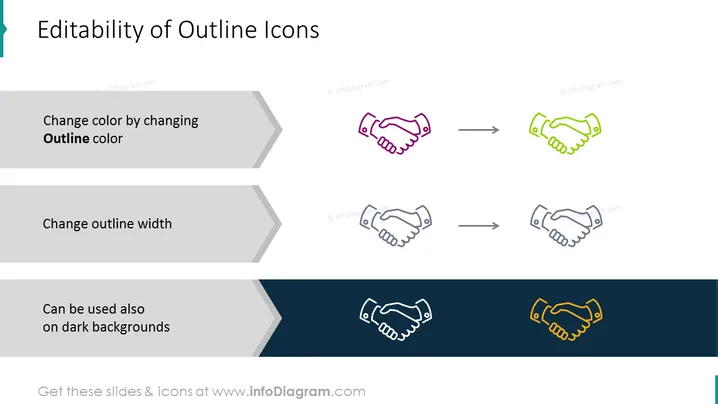
Editability of Outline Icons
Slide Content
The slide presents features of outline icons regarding their flexibility in design adjustments. "Change color by changing Outline color" indicates that the color of the outline icons is customizable. "Change outline width" means that the stroke size of the icons can be altered to fit different design needs. "Can be used also on dark backgrounds" demonstrates that outline icons maintain visibility against dark templates, showcasing adaptability for various backgrounds.
Graphical Look
- Title of the slide in bold, large font at the top
- Three separate sections, each featuring a graphical representation with accompanying text and an arrow pointing from a before state (icon with default style) to an after state (icon with the described adjustment)
- The first section shows an icon with its color changed
- The second section shows the same icon with an altered outline width
- The third section displays the icon on a dark background, maintaining its visibility
- The text appears in a bulleted list format with a unique arrow bullet shape, creating a sense of visual flow
- Each icon adjustment is represented by a pair of slightly differing icons, effectively visualizing the described change
- The contrasting background colors (white and dark blue) emphasize the icons’ versatility
The slide has a very clean and minimalistic design with good use of white space, which emphasizes the visual aids used to showcase the icons' editability. The flow from text to visual examples is clear and aids in understanding the concept presented on the slide.
Use Cases
- Presenting the customization options of graphic assets in a UI/UX design meeting.
- Demonstrating the versatility of icon sets while pitching to clients who may have varying brand guidelines.
- Training sessions for graphic designers on how to adapt icons to different themes and designs.
- Showcasing the advantages of vector icons over raster images in a marketing or branding presentation.
How to Edit
How to edit text & colors

How to expand / shorten diagram

How to Replace Icons in infoDiagram PPT


