
Reviews
Ihre Grafiken verleihen meinen Präsentationen eine nette Note, und ich habe sie kürzlich für eines meiner All-Hands-Meetings verwendet. Ihre Toolbox verleiht meinen Folien Professionalität, anstatt Standard-Clipart zu verwenden.
Ich brauchte einen neuen Blick auf einige meiner Folien. Ich habe versucht, einen Weg zu finden, einen Pinselschlag-Effekt zu erzielen, um zu unterstreichen, hervorzuheben, Farbe hinzuzufügen, und die handgeschriebenen Markierungen waren genau das Richtige. Sehr einfach zu bedienen, leicht in der Größe zu ändern, die Farbe zu ändern. Es war eine erschwingliche, perfekte Lösung und ich empfehle sie gerne weiter.
Die klare, saubere Optik der Grafiken und die Tatsache, dass ich die Farben leicht bearbeiten und an die Vorlage anpassen konnte, war mein Hauptgrund für den Kauf.
Description
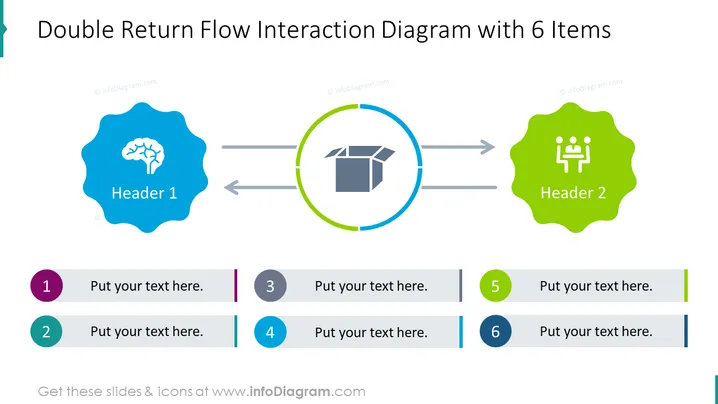
Double Return Flow Interaction Diagram with 6 Items
Slide Content
The slide presents a "Double Return Flow Interaction Diagram with 6 Items," illustrating a cyclical process with six stages. Each stage is designed for detailed explanation. "Header 1" and "Header 2" are placeholders for key points or topics within the cycle, which represent the beginning and end of the process. The numerated items, from 1 to 6, provide space for accompanying descriptions explaining each step or aspect of the interaction and how they contribute to the overall flow.
Graphical Look
- A large title at the top in bold, sans-serif font.
- Two stylized headers labeled "Header 1" and "Header 2," each inside a distinctively shaped, colored badge with an icon - a tree and group of people, respectively.
- A bidirectional arrow system connecting the two headers, implying a flow or interaction between these points.
- Six placeholders for text, each associated with a number from 1 to 6, providing structure for explanation or description of each item.
- The numbers are encircled and color-coded, correlating with colored bars to the right of each text placeholder, aiding in visual organization.
The slide has a clean and modern design with a clear focus on presenting a cyclical process. The use of colored shapes and icons, along with directionality in the arrows, helps emphasize the flow of information or steps.
Use Cases
- Presenting a business process or workflow where there is a continuous loop of activities.
- Demonstrating feedback mechanisms within a project or system.
- Illustrating a supply chain or logistical process with various steps and returns.
- Mapping customer journey or user experience that involves multiple touchpoints and back-and-forth interactions.
How to Edit
How to edit text & colors

How to expand / shorten diagram

How to Replace Icons in infoDiagram PPT


