
Your graphics add a nice touch to my presentations and I recently used them for one of my all-hands meetings. Your toolbox adds professionalism to my slides. Instead of using standard clipart.
Claude Jones, Director of Engineer, @Walmartlabs, USA

Your graphics add a nice touch to my presentations and I recently used them for one of my all-hands meetings. Your toolbox adds professionalism to my slides. Instead of using standard clipart.
Claude Jones, Director of Engineer, @Walmartlabs, USA

I needed a fresh look at some of my slides. I've tried to find a way to create a paintbrush effect, to underline, accentuate, add some color and the handwritten markers were just the things. Very easy to use, easy to size, change the color. It was an affordable, perfect solution and I'm happy to recommend it.
Anonymous, US
The crisp, clean look of the graphics, and the fact that it allowed me to easily edit and change the colors to match the template was my main reason for purchasing them.
Brandie Jenkins, E-learning Developer, USA
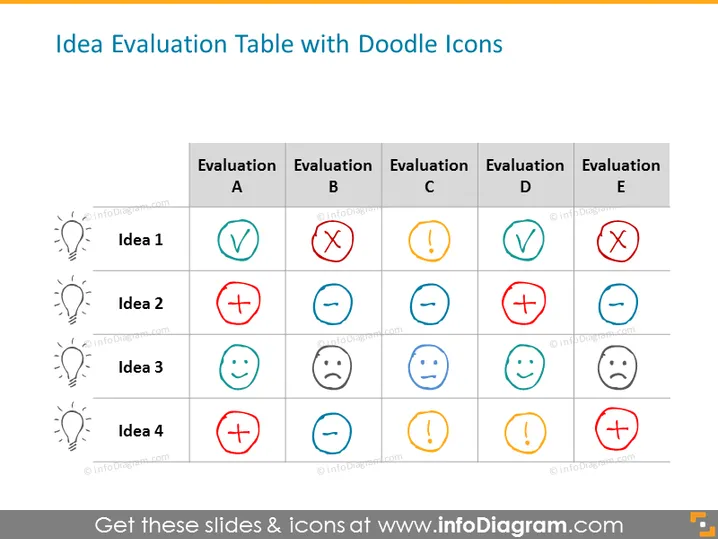
The slide is a matrix titled "Idea Evaluation Table with Doodle Icons" used to evaluate four ideas across five different criteria, labeled Evaluation A through E. Idea 1, for instance, is approved under Evaluation A and rejected under Evaluation B and E, indicating a mixed assessment. The other ideas (2, 3, and 4) also show varied evaluations. With 'check' meaning approval, 'cross' representing rejection, 'exclamation mark' suggesting caution or attention needed, and 'smiley' or 'sad face' indicating satisfaction or dissatisfaction, this visual layout offers a quick summary of an idea's status across various performance dimensions.
The slide design is clean and concise, using a simple color scheme and grid layout to convey information. The doodle icons add a playful and informal touch to the evaluation process.


