
Reviews
Your graphics add a nice touch to my presentations and I recently used them for one of my all-hands meetings. Your toolbox adds professionalism to my slides. Instead of using standard clipart.
I needed a fresh look at some of my slides. I've tried to find a way to create a paintbrush effect, to underline, accentuate, add some color and the handwritten markers were just the things. Very easy to use, easy to size, change the color. It was an affordable, perfect solution and I'm happy to recommend it.
The crisp, clean look of the graphics, and the fact that it allowed me to easily edit and change the colors to match the template was my main reason for purchasing them.
Description
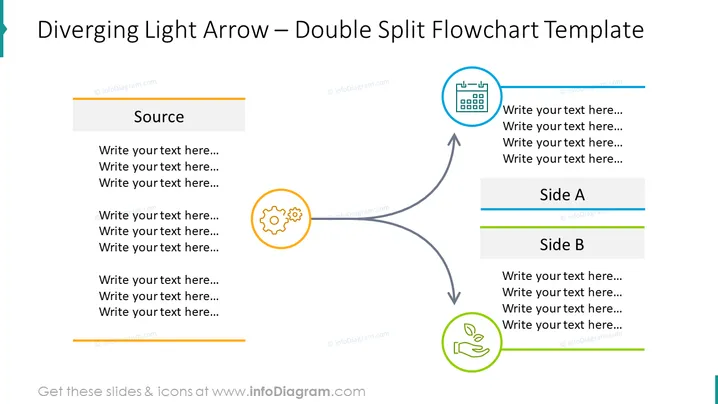
Diverging Light Arrow – Double Split Flowchart Template
Slide Content
The slide represents a flowchart template with a diverging light arrow design, signifying a process or concept originating from a single source and branching into two separate paths, Side A and Side B. Each path is detailed with placeholders for custom text, suggesting that this template is used for explaining dual outcomes or parallel processes stemming from a central element. The central "Source" is connected to two symbols, each symbolizing distinct categories or stages within the pathways.
Graphical Look
- The slide has a light background with a mix of grey, orange, blue, and green elements complementing it.
- The main feature is a large, central grey arrow splitting into two smaller arrows, pointing toward two separate text areas.
- Two colored boxes titled "Side A" and "Side B" are at the front and end of each arrow branch, with corresponding thin colored lines underscoring them.
- The 'Source' box at the base of the arrow is highlighted in a light grey shade.
- Three circular icons—one gear, one calendar, and one depicting a hand with leaf— are placed along the arrow's splits, each enclosed in colored circles matching the colors of the 'Side' boxes.
- Placeholder text, indicated by "Write your text here..." phrases, resides in every content area for user customization.
The slide is structured neatly, with a balanced layout that visually guides the observer from the source to the divided outcomes. The use of icons and color coding effectively segments the information.
Use Cases
- To present different strategies or outcomes that arise from a single decision point or project initiation.
- For comparing two different sets of results or impacts from a single action or event.
- In training or educational material to illustrate bifurcation in processes or choices.
- As a template for project proposals to show dual pathways or deliverables.
How to Edit
How to edit text & colors

How to expand / shorten diagram

How to Replace Icons in infoDiagram PPT


