
Reviews
Your graphics add a nice touch to my presentations and I recently used them for one of my all-hands meetings. Your toolbox adds professionalism to my slides. Instead of using standard clipart.
I needed a fresh look at some of my slides. I've tried to find a way to create a paintbrush effect, to underline, accentuate, add some color and the handwritten markers were just the things. Very easy to use, easy to size, change the color. It was an affordable, perfect solution and I'm happy to recommend it.
The crisp, clean look of the graphics, and the fact that it allowed me to easily edit and change the colors to match the template was my main reason for purchasing them.
Description
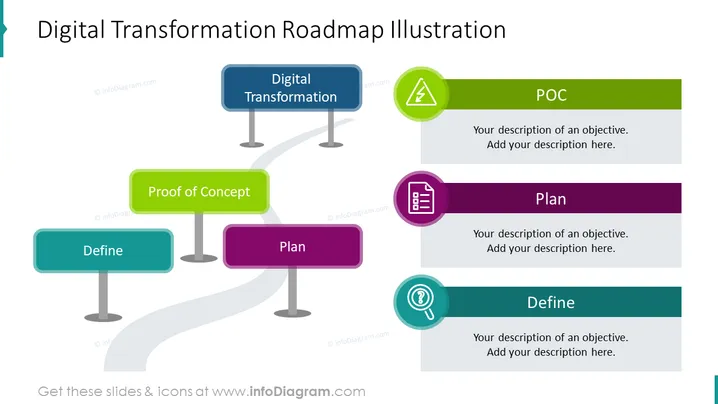
Digital Transformation Roadmap Illustration
Slide Content:
The PowerPoint slide is a visual representation of a roadmap for a digital transformation project. It features key stages such as "Define," where objectives are set; "Proof of Concept" (POC), where ideas are tested; and "Plan," where strategies are developed. Each stage is marked by a signpost indicating the current phase and has a space for adding descriptions or objectives, signifying a step-by-step progression in the transformation process.
Graphical Look:
- Three signpost shapes, each holding a phase name: "Define," "Proof of Concept," and "Plan."
- The signposts are connected by a winding grey road, indicating progression.
- Each signpost has an icons and is in a different color: teal, green, and purple.
- The slide's background is white.
The slide has a clean and thematic design with color-coded signposts and related icons that effectively communicate the stages of a digital transformation project, making the information easily digestible and visually engaging.
Use Cases:
This slide would be particularly useful in strategic planning meetings, project kick-off presentations, workshops on digital transformation, or as a visual guide in discussions with stakeholders about the phases and progress of a digital transformation initiative.
How to Edit
How to edit text & colors

How to expand / shorten diagram

How to Replace Icons in infoDiagram PPT


