
Reviews
Your graphics add a nice touch to my presentations and I recently used them for one of my all-hands meetings. Your toolbox adds professionalism to my slides. Instead of using standard clipart.
I needed a fresh look at some of my slides. I've tried to find a way to create a paintbrush effect, to underline, accentuate, add some color and the handwritten markers were just the things. Very easy to use, easy to size, change the color. It was an affordable, perfect solution and I'm happy to recommend it.
The crisp, clean look of the graphics, and the fact that it allowed me to easily edit and change the colors to match the template was my main reason for purchasing them.
Description
Digital Transformation Project Template
Slide Content
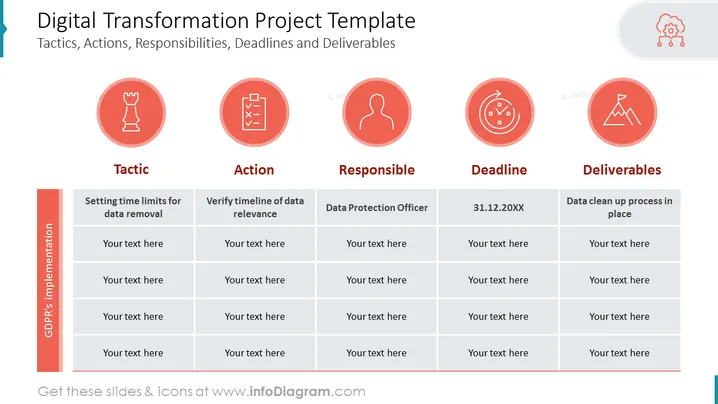
The slide titled "Digital Transformation Project Template" presents aspects of a project, namely tactics, actions, responsibilities, deadlines, and deliverables. The first tactic mentions "Setting time limits for data removal," which likely involves creating policies for timely data deletion. The corresponding action is "Verify timeline of data relevance," hinting at regular checks to ensure data remains pertinent. The responsible party is the "Data Protection Officer," indicating this individual oversees data privacy compliance. The deadline is "31.12.20XX," which is probably an end-of-year target date. Lastly, the deliverable is "Data clean up process in place," signifying a tangible outcome is to have an established data sanitation protocol.
Graphical Look
- The slide has a clean, modern design with a light background and dark text for high contrast and readability.
- Five circular, salmon-colored icons with white graphical elements are aligned horizontally across the top, each representing a different aspect of the project template (Tactic, Action, Responsible, Deadline, Deliverables).
- Below each icon is the corresponding category title in bold, dark text.
- A table with five columns is situated below the headers, separated into rows for entering specific project details. The first column has a different background color, drawing attention to the "GDPR's implementation."
- At the top-left corner, there is a design element featuring a blue, banner-like shape.
- Each table cell has a placeholder labeled "Your text here," suggesting customization for particular project elements.
The overall look of the slide is professional and structured, utilizing color and iconography to visually categorize information and guide the viewer through the project planning elements.
Use Cases
- Outlining the phases and requirements of a digital transformation initiative during a project planning meeting.
- Assigning specific tasks and responsibilities to team members in a project kickoff presentation.
- Tracking project progress and deadlines in routine status update meetings with stakeholders.
- Communicating the expected deliver ables and outcomes of a digital transformation project to members of an organization or investors.
How to Edit
How to edit text & colors

How to expand / shorten diagram

How to Replace Icons in infoDiagram PPT


