
Reviews
Ihre Grafiken verleihen meinen Präsentationen eine nette Note, und ich habe sie kürzlich für eines meiner All-Hands-Meetings verwendet. Ihre Toolbox verleiht meinen Folien Professionalität, anstatt Standard-Clipart zu verwenden.
Ich brauchte einen neuen Blick auf einige meiner Folien. Ich habe versucht, einen Weg zu finden, einen Pinselschlag-Effekt zu erzielen, um zu unterstreichen, hervorzuheben, Farbe hinzuzufügen, und die handgeschriebenen Markierungen waren genau das Richtige. Sehr einfach zu bedienen, leicht in der Größe zu ändern, die Farbe zu ändern. Es war eine erschwingliche, perfekte Lösung und ich empfehle sie gerne weiter.
Die klare, saubere Optik der Grafiken und die Tatsache, dass ich die Farben leicht bearbeiten und an die Vorlage anpassen konnte, war mein Hauptgrund für den Kauf.
Description
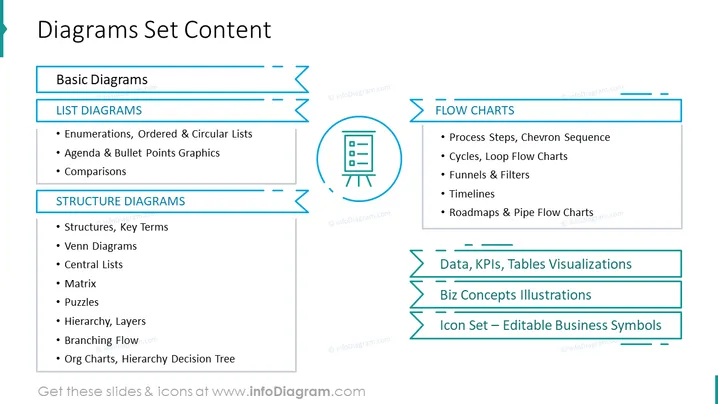
Diagrams Set Content
Slide Content
The slide presents an overview of various categories of diagrams that might be included within a set, signifying a variety of tools available for presenting information. The Basic Diagrams category includes "List Diagrams," which cover Enumerations, Ordered & Circular Lists for organizing items; Agenda & Bullet Points Graphics for highlighting key points; and Comparisons for contrasting different concepts. Under Structure Diagrams, there are Structures, Key Terms for foundational concepts; Venn Diagrams for showing overlaps; Central Lists; Matrix layouts for organizing data; Puzzles for problem-solving illustrations; Hierarchy and Layers for organizational structures; and Branching Flows and Org Charts for decision trees. The Flow Charts encompass Process Steps and Chevron Sequences for procedural representation; Cycles and Loop Flow Charts for repetitive processes; Funnels & Filters for narrowing down concepts; Timelines for chronological sequences; and Roadmaps & Pipe Flow Charts for project planning. Further categories include "Data, KPIs, Tables Visualizations" for representing metrics, "Biz Concepts Illustrations" for business frameworks, and an "Icon Set – Editable Business Symbols" for customizable visual aid.
Graphical Look
- The slide uses a blue and teal color scheme.
- The title "Diagrams Set Content" is prominently displayed at the top in large, bold font.
- There are three key sections: "Basic Diagrams," "Structure Diagrams," and "Flow Charts," each with their respective bullet points listed beneath in a smaller font.
- Each section title is encapsulated within a color-accented textbox with a horizontal line extending to the right.
- The "Flow Charts" section includes a circular icon of a flow chart diagram, in teal, to the left of the text.
- The slide employs a mix of solid and dashed lines for visual separation.
- There are short descriptions next to each bullet point, providing more detail about the diagram types.
- The layout is clean and symmetric, separating content into two columns.
- The font style is modern and easy to read.
The overall look of the slide is sleek and professional, utilizing a consistent color theme and layout that is conducive to clarity and ease of understanding. The use of icons and varying line styles adds a dynamic element to the visual hierarchy of the content.
Use Cases
- To introduce a diagram toolkit during business or educational presentations to familiarize the audience with available visual aids.
- In workshops or training sessions where participants need to understand different types of diagrams and when to use them.
- As part of a sales pitch when offering diagramming software or resources to potential clients or partners.
- During project planning meetings to decide which types of diagrams will best communicate various aspects of the project to stakeholders.
How to Edit
How to edit text & colors

How to expand / shorten diagram

How to Replace Icons in infoDiagram PPT


