
Reviews
Sus gráficos añaden un toque agradable a mis presentaciones y recientemente los usé para una de mis reuniones generales. Su conjunto de herramientas añade profesionalismo a mis diapositivas. En lugar de usar imágenes prediseñadas estándar.
Necesitaba un aspecto fresco para algunas de mis diapositivas. Había intentado encontrar una forma de crear un efecto de pincel, de subrayar, acentuar, añadir algo de color y los marcadores escritos a mano fueron justo lo que necesitaba. Muy fácil de usar, fácil de ajustar el tamaño, cambiar el color. Fue una solución asequible y perfecta, y estoy feliz de recomendarla.
El aspecto nítido y limpio de los gráficos, y el hecho de que me permitiera editar y cambiar fácilmente los colores para que coincidieran con la plantilla fue mi principal razón para comprarlos.
Description
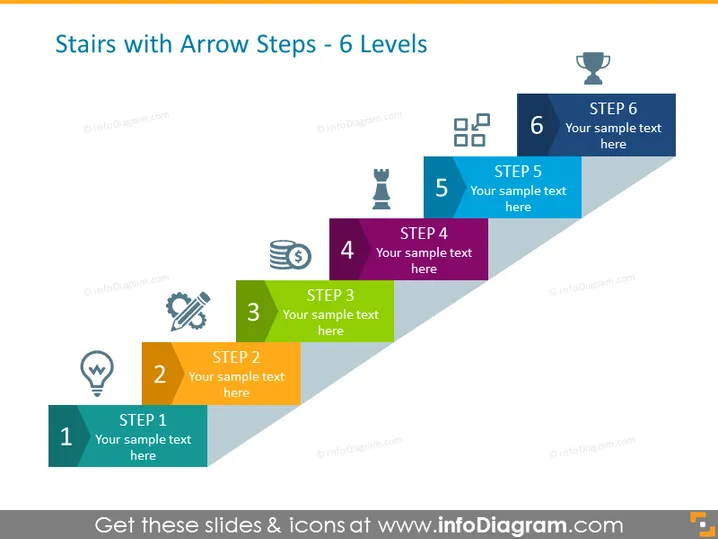
Stairs with Arrow Steps - 6 Levels
Slide Content
The slide represents a process divided into six distinct steps, each depicted as an ascending stair step with an arrow pointing upwards, indicating progression. Step 1 starts with a light bulb icon, suggesting an idea or inception phase. Step 2 features a pen tip, implying planning or documentation. Step 3's wrench and screw convey assembly or development. Step 4 is denoted by stacked coins, representing financial aspects or profit. Step 5 has a trophy, symbolizing achievement or reward. Finally, Step 6 is capped with checkmarks, indicating completion or final evaluation.
Graphical Look
- A series of six rectangular shapes, each resembling a step with a rising arrow, creating a staircase.
- Each step is color-coded, providing a visual distinction between the stages.
- Every step is numbered from 1 to 6, aiding in numerical order recognition.
- Icons are used on each step, correlating to the step's meaning.
- Text placeholders are present on each step for customization.
- The use of shadows gives a 3D effect to the steps.
The slide is visually engaging, using colors and icons to clearly represent each stage of a process. The design is clean and modern, making it easy to follow and understand.
Use Cases
- To illustrate a multi-stage project plan, outlining the progression from concept to completion.
- For educational presentations, demonstrating a step-by-step approach to learning a new skill or subject.
- In sales pitches, to describe the journey a customer might take from discovery to purchase.
- During company meetings, to show progression and development strategies over time.
How to Edit
How to edit text & colors

How to expand / shorten diagram

How to Replace Icons in infoDiagram PPT


