
Reviews
Your graphics add a nice touch to my presentations and I recently used them for one of my all-hands meetings. Your toolbox adds professionalism to my slides. Instead of using standard clipart.
I needed a fresh look at some of my slides. I've tried to find a way to create a paintbrush effect, to underline, accentuate, add some color and the handwritten markers were just the things. Very easy to use, easy to size, change the color. It was an affordable, perfect solution and I'm happy to recommend it.
The crisp, clean look of the graphics, and the fact that it allowed me to easily edit and change the colors to match the template was my main reason for purchasing them.
Description
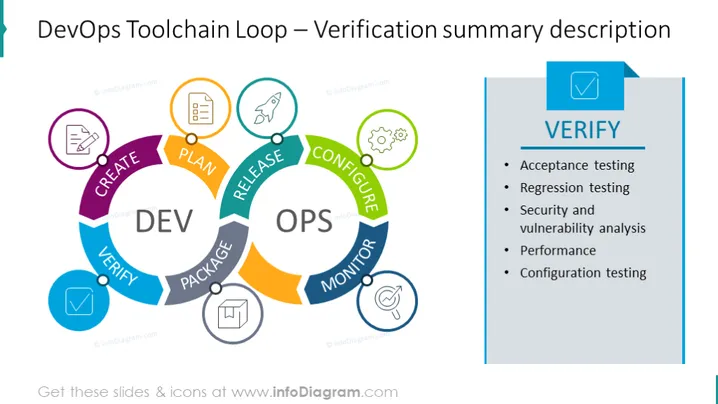
DevOps Toolchain Loop – Verification summary description
Slide Content
The slide presents the verification stage within a DevOps Toolchain Loop, highlighting key activities involved in this phase. Acceptance testing involves evaluating a system's compliance with business criteria. Regression testing checks for new code impacts on existing features. Security and vulnerability analysis assess potential threats and weaknesses. Performance testing measures system responsiveness under various conditions. Configuration testing ensures settings are correctly applied across environments.
Graphical Look
- A circular, multicolored loop diagram dominates the left side of the slide, representing the DevOps lifecycle stages with labeled segments and connected by arrows.
- Each segment of the loop is colored differently (purple, blue, teal, green, orange, and dark blue) and contains an icon relevant to the stage it represents, such as a pen for CREATE or a rocket for RELEASE.
- A separate rectangular section on the right, with a light blue background, contains a vertically aligned text box outlining verification activities.
- The title "VERIFY" is prominently displayed in a dark blue rectangular box with a checkmark icon, followed by a smaller horizontal line and a bulleted list of the verification activities.
- The icons used in the loop are encircled with a light outline, suggesting a stylized, clean, and modern design approach.
The slide is visually balanced, with the colorful loop providing a dynamic representation of the DevOps process while the crisp, clean text box clearly lists the verification activities. The use of color and icons aids in distinguishing each stage and activity, making the slide educational and easy to follow.
Use Cases
- To educate teams about the DevOps stages and the role of verification in software development during internal training sessions.
- As part of a presentation to stakeholders to illustrate the rigor and thoroughness of quality assurance processes in the DevOps cycle.
- In a workshop setting to discuss and plan improvements to the verification process within an organization's DevOps practices.
- During a conference or webinar to foster discussions about best practices in DevOps methodologies, particularly focusing on the verification phase's importance for maintaining high-quality software releases.
How to Edit
How to edit text & colors

How to expand / shorten diagram

How to Replace Icons in infoDiagram PPT


