
Reviews
Sus gráficos añaden un toque agradable a mis presentaciones y recientemente los usé para una de mis reuniones generales. Su conjunto de herramientas añade profesionalismo a mis diapositivas. En lugar de usar imágenes prediseñadas estándar.
Necesitaba un aspecto fresco para algunas de mis diapositivas. Había intentado encontrar una forma de crear un efecto de pincel, de subrayar, acentuar, añadir algo de color y los marcadores escritos a mano fueron justo lo que necesitaba. Muy fácil de usar, fácil de ajustar el tamaño, cambiar el color. Fue una solución asequible y perfecta, y estoy feliz de recomendarla.
El aspecto nítido y limpio de los gráficos, y el hecho de que me permitiera editar y cambiar fácilmente los colores para que coincidieran con la plantilla fue mi principal razón para comprarlos.
Description
DevOps Toolchain Loop – Package summary description
Slide Content
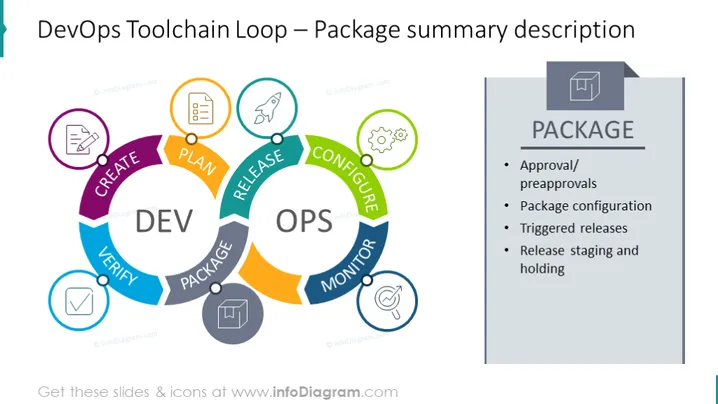
The slide presents a summary of the 'Package' phase in the DevOps Toolchain Loop, detailing the crucial steps in this stage, such as "Approval/preapprovals," "Package configuration," "Triggered releases," and "Release staging and holding." Each item represents a structured approach to managing software releases, where "Approval/preapprovals" ensure governance, "Package configuration" refers to setting up the software for deployment, "Triggered releases" automate the release process, and "Release staging and holding" involves preparing and verifying the release before it goes live.
Graphical Look
- A colorful circular diagram on the left depicts the DevOps loop, segmented into stages of development and operations.
- Each segment of the loop is labeled with a different phase such as "CREATE," "VERIFY," "PACKAGE," etc., and is color-coded.
- Icons within colored circles are placed above each DevOps phase, illustrating the step's function.
- Directly to the right of the diagram, a larger rectangle with a gradient of grey shades displays the word "PACKAGE" prominently at the top.
- A list beneath "PACKAGE" with bullet points outlines key aspects of this DevOps stage.
- The overall slide has a two-column layout, with the diagram on the left and text detail on the right.
The slide's overall look is clean and modern, emphasizing distinct sections for visual clarity. The use of colors and icons effectively communicates the cyclic nature of DevOps practices.
Use Cases
- Explaining the 'Package' stage during a DevOps training session or workshop.
- Detailing the release management process to developers and operation teams in a company meeting.
- Outlining governance and deployment strategies in a project kickoff presentation.
- Using it as a part of a larger presentation to stakeholders to illustrate software lifecycle management.
How to Edit
How to edit text & colors

How to expand / shorten diagram

How to Replace Icons in infoDiagram PPT


