
Reviews
Ihre Grafiken verleihen meinen Präsentationen eine nette Note, und ich habe sie kürzlich für eines meiner All-Hands-Meetings verwendet. Ihre Toolbox verleiht meinen Folien Professionalität, anstatt Standard-Clipart zu verwenden.
Ich brauchte einen neuen Blick auf einige meiner Folien. Ich habe versucht, einen Weg zu finden, einen Pinselschlag-Effekt zu erzielen, um zu unterstreichen, hervorzuheben, Farbe hinzuzufügen, und die handgeschriebenen Markierungen waren genau das Richtige. Sehr einfach zu bedienen, leicht in der Größe zu ändern, die Farbe zu ändern. Es war eine erschwingliche, perfekte Lösung und ich empfehle sie gerne weiter.
Die klare, saubere Optik der Grafiken und die Tatsache, dass ich die Farben leicht bearbeiten und an die Vorlage anpassen konnte, war mein Hauptgrund für den Kauf.
Description
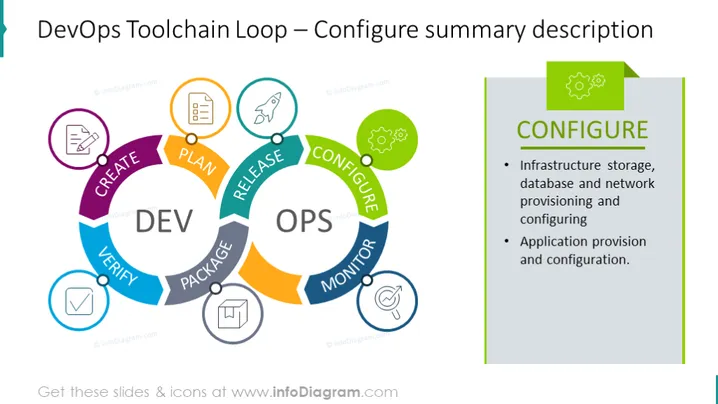
DevOps Toolchain Loop – Configure summary description
Slide Content
The slide provides a summary description of the "Configure" phase in the DevOps Toolchain Loop, highlighting two key areas: infrastructure storage, database, and network provisioning and configuring, which entails setting up and preparing storage solutions, databases, and network systems for use; and application provision and configuration, which involves deploying and setting up software applications within the environment.
Graphical Look
- A large circular diagram occupies the left side, beautifully divided into colorful segments labeled with phases of DevOps.
- Each segment has a unique color and is connected to form a loop, representing a continuous cycle.
- The 'CONFIGURE' phase is highlighted with a green border and connected to an adjacent rectangle containing corresponding text.
- Icons within colored circles sit atop each segment, visually symbolizing the phase steps, like planning, creating, verifying, and others.
- A prominent title to the right, with a bold 'CONFIGURE' text, draws attention to the specific phase.
- The right side features a shaded rectangle with more detailed bullet points explaining the 'CONFIGURE' phase.
- Both sides of the slide are bordered in a cohesive color scheme, adding to the visual organization.
The slide has a clean and professional design, with vibrant colors enhancing the visual appeal. The diagram offers an intuitive understanding of the DevOps process flow.
Use Cases
- In a presentation to explain the DevOps lifecycle and the role of configuration management to software development teams.
- During a workshop or training session focusing on implementing DevOps practices, to illustrate the various stages and their significance.
- As part of a pitch to management or stakeholders to showcase the comprehensive approach taken by the team in infrastructure and application setup.
- For onboarding new employees in IT and DevOps roles to help them understand the company's development and deployment processes.
How to Edit
How to edit text & colors

How to expand / shorten diagram

How to Replace Icons in infoDiagram PPT


