

Your graphics add a nice touch to my presentations and I recently used them for one of my all-hands meetings. Your toolbox adds professionalism to my slides. Instead of using standard clipart.
Claude Jones, Director of Engineer, @Walmartlabs, USA

Your graphics add a nice touch to my presentations and I recently used them for one of my all-hands meetings. Your toolbox adds professionalism to my slides. Instead of using standard clipart.
Claude Jones, Director of Engineer, @Walmartlabs, USA
I needed a fresh look at some of my slides. I've tried to find a way to create a paintbrush effect, to underline, accentuate, add some color and the handwritten markers were just the things. Very easy to use, easy to size, change the color. It was an affordable, perfect solution and I'm happy to recommend it.
Anonymous, US
The crisp, clean look of the graphics, and the fact that it allowed me to easily edit and change the colors to match the template was my main reason for purchasing them.
Brandie Jenkins, E-learning Developer, USA
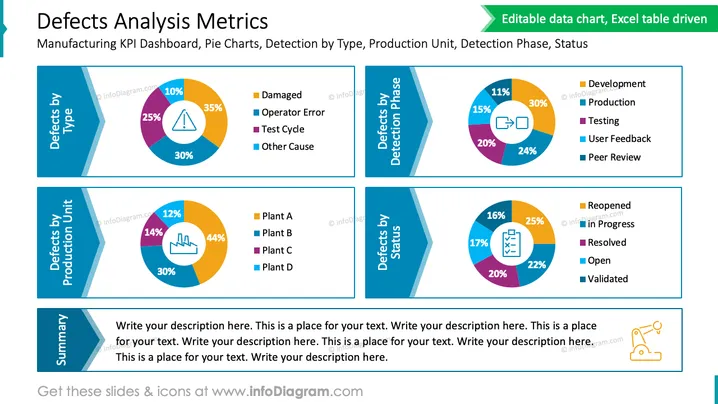
The slide titled 'Defects Analysis Metrics' is geared towards providing a dashboard overview of key performance indicators (KPIs) related to manufacturing defects. It compares defects by type, detection phase, production unit, and status. Each category is represented by a pie chart accompanied by a color-coded legend — 'Defects by type' shows categories such as Damaged, Operator Error, Test Cycle, and Other Cause. 'Defects by detection phase' differentiates between Development, Production, Testing, User Feedback, and Peer Review. 'Defects by production unit' compares different plants labeled A through D. Lastly, 'Defects by status' includes statuses like Reopened, In Progress, Resolved, Open, and Validated. There's also a 'Summary' section below the charts where descriptive text can be added.
The slide features a clean and professional design, with a mix of bold colors and soft blue background shades to create a visually appealing contrast. It utilizes a consistent theme with rectangular color tabs next to the pie charts, allowing for quick reference and interpretation.
The PowerPoint slide titled 'Defects Analysis Metrics' displays a collection of pie charts relating to quality control within a manufacturing setting. The first chart, 'Defects by Type', segments defects into categories: Damaged (35%), Operator Error (30%), Test Cycle (25%), and Other Cause (10%). The second chart, 'Defects by Detection Phase', distinguishes the stages at which defects were identified: Development (30%), Production (24%), Testing (20%), User Feedback (15%), and Peer Review (11%). The third chart, 'Defects by Production Unit,' shows the distribution of defects across different facilities: Plant A (44%), Plant B (30%), Plant C (14%), and Plant D (12%). The fourth chart, 'Defects by Status', tracks the resolution progress of identified defects: In Progress (25%), Resolved (22%), Open (20%), Reopened (17%), and Validated (16%). A summary text box at the bottom invites additional commentary or analysis.
The overall design is harmonious with a blue and green color scheme, providing a clear representation of data with aest ## Defects Analysis Metrics
The PowerPoint slide 'Defects Analysis Metrics' presents four pie charts, each relating to different aspects of product quality analysis within a manufacturing context. The 'Defects by Type' chart breaks down defects into categories such as Damaged, Operator Error, Test Cycle, and Other Cause, each with a corresponding color and percentage. The 'Defects by Detection Phase' chart categorizes defects found during Development, Production, Testing, User Feedback, and Peer Review. The 'Defects by Production Unit' chart displays the distribution of defects across four different plants, indicated as Plant A, B, C, and D. Lastly, the 'Defects by Status' chart provides insight into the status of defects, whether they are Reopened, In Progress, Resolved, Open, or Validated. Beneath these charts is a summary area for additional explanations or comments.
The slide has a professional and sleek appearance, with a consistent blue and green color theme that is visually pleasing and easy to interpret. The use of pie charts, color-coding, and clear section headings makes the information accessible and reader-friendly.
The slide 'Defects Analysis Metrics' displays data on manufacturing defects categorized by type, detection phase, production unit, and status. Under 'Defects by Type,' it lists Damaged, Operator Error, Test Cycle, and Other Cause. 'Defects by Detection Phase' includes Development, Production, Testing, User Feedback, and Peer Review. 'Defects by Production Unit' features plants A through D. Lastly, 'Defects by Status' shows Reopened, In Progress, Resolved, Open, and Validated percentages. The Summary space at the bottom provides an area for additional remarks or analysis to accompany the data presented.
The slide possesses a tidy and professional layout, with smartly used space that allows each pie chart to stand out. The color scheme is vibrant yet not overwhelming, facilitating the clear presentation of complex data.
The PowerPoint slide titled 'Defects Analysis Metrics' provides a visual representation of key performance indicators related to manufacturing defects using four pie charts. Each chart focuses on a different metric: 'Defects by Type' with categories like Damaged and Operator Error; 'Defects by Detection Phase' including Phases like Production and Testing; 'Defects by Production Unit' differentiating between Plants A to D; and 'Defects by Status' showing statuses such as In Progress or Resolved. There is a Summary section for additional notes below the charts.
The slide uses a blue and green color palette that gives it a professional, clean look. The design is straightforward, with a strong focus on the data displayed in the pie charts and easy-to-understand legends that correlate different colors to specific data categories or sectors.
The 'Defects Analysis Metrics' slide provides a visual breakdown of Key Performance Indicators (KPIs) for manufacturing defects using pie charts that categorize defect types, detection phases, production units, and statuses. 'Defects by Type' chart categorizes defects as Damaged, Operator Error, Test Cycle, and Other Cause. 'Defects by Detection Phase' includes Development, Production, Testing, User Feedback, and Peer Review. 'Defects by Production Unit' differentiates defects among Plant A, Plant B, Plant C, and Plant D. Lastly, 'Defects by Status' sorts defects by Reopened, In Progress, Resolved, Open, and Validated statuses. For added detail, a Summary section is provided.
The overall design of the slide is clean, modern, and data-focused, using a blue and green color scheme to denote different aspects of defect analysis. Pie charts are paired with color-coordinated legends to allow for quick comprehension of the information presented.
The slide entitled "Defects Analysis Metrics" is structured around Key Performance Indicators (KPIs) pertaining to manufacturing defects, segmented into four pie charts. Each chart targets a theme: 'Defects by Type' offers insights into the causes of defects like 'Damaged' or 'Operator Error'; 'Defects by Detection Phase' shows at which stage in the process defects are uncovered, such as 'Development' or 'Testing'; 'Defects by Production Unit' compares the occurrence of defects across various plants, labeled Plant A through D; 'Defects by Status' illustrates the current handling status of defects including 'In Progress,' 'Resolved,' or 'Open.' A 'Summary' field is available for contextual notes or conclusions.
The slide's graphical layout is professional, conveying complex manufacturing defect data through a combination of vibrant, easily distinguishable charts and legends. The blue and green theme offers both visual appeal and functional clarity.
The slide titled 'Defects Analysis Metrics' serves as a KPI dashboard for manufacturing, featuring pie charts to depict defects analysis. The charts examine 'Defects by Type' showing common causes like 'Damaged' and 'Operator Error', 'Defects by Detection Phase' pinpointing when defects are caught ranging from 'Development' to 'Peer Review', 'Defects by Production Unit' comparing different plants labeled A to D, and 'Defects by Status' indicating the resolution status of defects from 'In Progress' to 'Validated'. Additionally, a summary section provides space for contextual insight or explanations related to the charts.
The graphical design of the slide is sleek and corporate, with sharp, clean lines and a color palette chosen for clarity and visual impact. The charts are neatly presented with consistent stylistic elements, lending the slide a polished and professional look.



