
Reviews
Your graphics add a nice touch to my presentations and I recently used them for one of my all-hands meetings. Your toolbox adds professionalism to my slides. Instead of using standard clipart.
I needed a fresh look at some of my slides. I've tried to find a way to create a paintbrush effect, to underline, accentuate, add some color and the handwritten markers were just the things. Very easy to use, easy to size, change the color. It was an affordable, perfect solution and I'm happy to recommend it.
The crisp, clean look of the graphics, and the fact that it allowed me to easily edit and change the colors to match the template was my main reason for purchasing them.
Description
WHAT IS DATA SCIENCE?
Slide Content
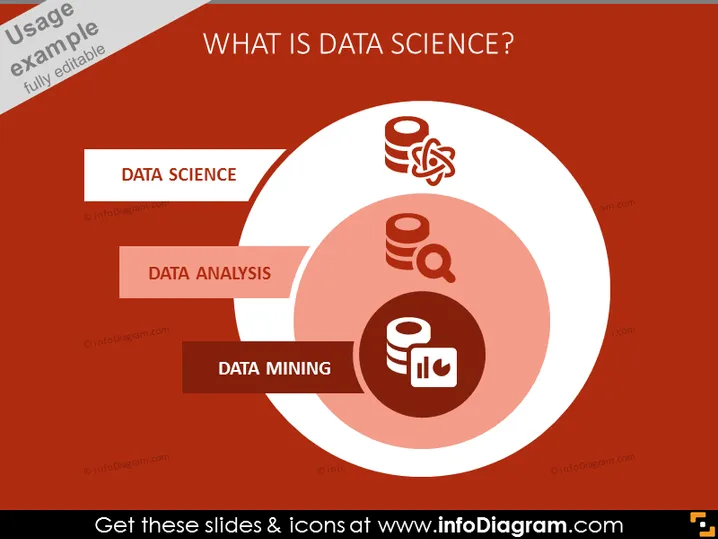
The PowerPoint slide is titled "WHAT IS DATA SCIENCE?" and illustrates three key concepts associated with data science: Data Science, Data Analysis, and Data Mining. Data Science is represented with an icon of a database and a gear, symbolizing the technical and mechanical aspects of managing and processing data. Data Analysis is depicted with a magnifying glass and a database, denoting the examination and exploration of data to uncover patterns. Data Mining is shown with a graph and a database, indicating the process of sorting through large data sets to identify relationships and insights.
Graphical Look
- The slide background color is a dark red or maroon shade.
- The title "WHAT IS DATA SCIENCE?" is written in large, white capitalized letters at the top of the slide.
- There are three light circles layered behind the text boxes, creating a depth effect.
- Each concept has a corresponding icon: Data Science shows a database and gear, Data Analysis features a magnifying glass and database, and Data Mining includes a graph and a stack of data.
- Text boxes for each concept are aligned to the left and have a white background with red text, creating a contrast with the slide's background.
- The icons are color-coordinated with the circles and text boxes, using shades of white and red.
The overall look of the slide is modern and minimalist with a focus on clarity and visual hierarchy. The color scheme is consistent and the use of icons and circles provides a clean and organized visual representation of each concept.
Use Cases
- To introduce the field of data science and related concepts in an educational setting or training workshop.
- In a business meeting to explain the role of data science within the organization's strategy.
- During a conference presentation to provide a high-level overview of data science and its components.
- In a pitch to potential investors highlighting the importance of data science for data-driven decision-making within a company.
How to Edit
How to edit text & colors

How to expand / shorten diagram

How to Replace Icons in infoDiagram PPT


