
Reviews
Ihre Grafiken verleihen meinen Präsentationen eine nette Note, und ich habe sie kürzlich für eines meiner All-Hands-Meetings verwendet. Ihre Toolbox verleiht meinen Folien Professionalität, anstatt Standard-Clipart zu verwenden.
Ich brauchte einen neuen Blick auf einige meiner Folien. Ich habe versucht, einen Weg zu finden, einen Pinselschlag-Effekt zu erzielen, um zu unterstreichen, hervorzuheben, Farbe hinzuzufügen, und die handgeschriebenen Markierungen waren genau das Richtige. Sehr einfach zu bedienen, leicht in der Größe zu ändern, die Farbe zu ändern. Es war eine erschwingliche, perfekte Lösung und ich empfehle sie gerne weiter.
Die klare, saubere Optik der Grafiken und die Tatsache, dass ich die Farben leicht bearbeiten und an die Vorlage anpassen konnte, war mein Hauptgrund für den Kauf.
Description
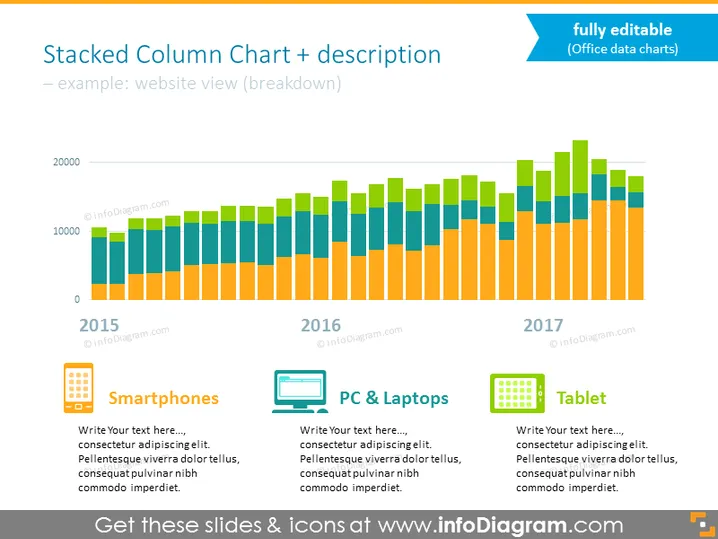
Stacked Column Chart + description
Slide Content
The slide presents a stacked column chart showing a breakdown of a website's views by device category over a three-year period—2015 to 2017. Each year is represented by a set of columns in different colors, which indicate the amount of views from smartphones, PCs & laptops, and tablets. Underneath each category, there is a placeholder for additional text, presumably to provide more specific details or analysis about that category. This slide is intended to visualize and compare data based on categorical subdivisions over time.
Graphical Look
- A large stacked column chart dominates the upper two-thirds of the slide.
- Each stacked column is composed of distinct colors representing different device categories.
- The y-axis on the left shows numeric values, presumably website view counts.
- The x-axis lists years (2015, 2016, 2017) below the corresponding set of columns.
- Below the chart, there are three colored rectangles aligning with their respective columns above; they each have an icon and title (Smartphones, PC & Laptops, Tablet).
- Next to each rectangle is a text box with placeholder text for adding descriptions.
The slide is designed with a clean, professional look featuring a cohesive color scheme. The chart is clearly the focal point, providing a visual representation of data that is easy to understand at a glance.
Use Cases
- Presenting website analytics and user behavior trends to stakeholders.
- Comparing device-based performance metrics during marketing or sales meetings.
- Demonstrating the effectiveness of a responsive website design to a client or team.
- Analyzing year-over-year growth in website traffic during annual reports or strategic reviews.
How to Edit
How to edit text & colors

How to expand / shorten diagram

How to Replace Icons in infoDiagram PPT


