

Your graphics add a nice touch to my presentations and I recently used them for one of my all-hands meetings. Your toolbox adds professionalism to my slides. Instead of using standard clipart.
Claude Jones, Director of Engineer, @Walmartlabs, USA

Your graphics add a nice touch to my presentations and I recently used them for one of my all-hands meetings. Your toolbox adds professionalism to my slides. Instead of using standard clipart.
Claude Jones, Director of Engineer, @Walmartlabs, USA
I needed a fresh look at some of my slides. I've tried to find a way to create a paintbrush effect, to underline, accentuate, add some color and the handwritten markers were just the things. Very easy to use, easy to size, change the color. It was an affordable, perfect solution and I'm happy to recommend it.
Anonymous, US
The crisp, clean look of the graphics, and the fact that it allowed me to easily edit and change the colors to match the template was my main reason for purchasing them.
Brandie Jenkins, E-learning Developer, USA
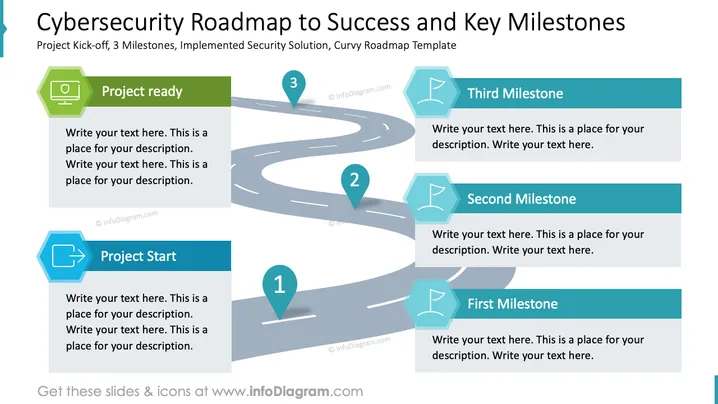
The slide outlines a "Cybersecurity Roadmap to Success" detailing the key stages of a cybersecurity project. It includes a "Project Start" highlighting initial steps, essential for laying a solid foundation. "Project Ready" indicates readiness to implement planned strategies. Three milestones are detailed: "First Milestone" represents achieving the initial stage of implementation, "Second Milestone" signifies further progress, and "Third Milestone" marks the successful completion of key tasks.
The slide features a curvy, winding road graphic, symbolizing the journey through the project stages.
Milestone markers are represented by location pin icons numbered 1 to 3, placed strategically on the road.
"Project Start" and "Project Ready" have distinctly colored blocks with icons indicating progress and readiness.
The milestones are highlighted in turquoise hexagon shapes, each accompanied by a matching flag icon.
Text boxes align beside the road path for descriptive information about each stage and milestone.
The background is simple and light, ensuring the roadmap and text are easily visible and the key focus.
This slide uses vivid colors and a clear, symbolic road path to effectively illustrate the step-by-step process of project development. Each milestone is distinctly visualized to assist in easy tracking and comprehension.
Project Planning Presentations: Use this slide to demonstrate the phases of a project to stakeholders and team members.
Progress Tracking Meetings: Helpful for updating management on project milestones and achievements in regular meetings.
Training Sessions: Educate new employees or trainees on the workflow of a cybersecurity project.
Proposal Development: Use in proposals to outline a prospective project plan to clients or partners.



