
Reviews
Your graphics add a nice touch to my presentations and I recently used them for one of my all-hands meetings. Your toolbox adds professionalism to my slides. Instead of using standard clipart.
I needed a fresh look at some of my slides. I've tried to find a way to create a paintbrush effect, to underline, accentuate, add some color and the handwritten markers were just the things. Very easy to use, easy to size, change the color. It was an affordable, perfect solution and I'm happy to recommend it.
The crisp, clean look of the graphics, and the fact that it allowed me to easily edit and change the colors to match the template was my main reason for purchasing them.
Description
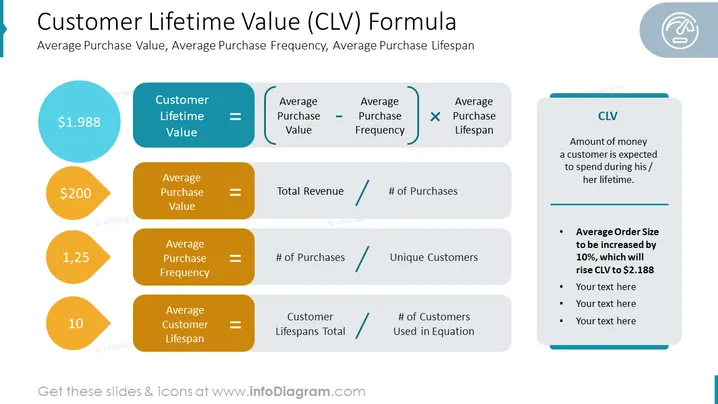
Customer Lifetime Value (CLV) Formula
Slide Content:
- Customer Lifetime Value (CLV): The total amount of money a customer is expected to spend during their lifetime as a customer.
- Average Purchase Value: The average amount of money a customer spends per purchase.
- Average Purchase Frequency: The average number of times a customer makes a purchase in a given period of time.
- Average Purchase Lifespan: The average length of time a customer is a customer.
Graphical Look:
- The slide has a simple and clean design, with a white background and black text.
- The title of the slide is displayed in a large, bold font at the top of the slide.
- The colors on the slide are blue, orange, and white. This color scheme is professional and easy on the eyes.
- The slide has black text.
Use Cases
You can use such a slide in a variety of settings, such as:
- Marketing presentations: To justify marketing investments by showing how much revenue is generated from customer lifetime value.
- Customer success presentations: To show customers how the company is focused on building long-term relationships and increasing their lifetime value.
- Investor presentations: To show investors that the company has a sustainable business model and is generating revenue from repeat customers.
How to Edit
How to edit text & colors

How to expand / shorten diagram

How to Replace Icons in infoDiagram PPT


