

Your graphics add a nice touch to my presentations and I recently used them for one of my all-hands meetings. Your toolbox adds professionalism to my slides. Instead of using standard clipart.
Claude Jones, Director of Engineer, @Walmartlabs, USA

Your graphics add a nice touch to my presentations and I recently used them for one of my all-hands meetings. Your toolbox adds professionalism to my slides. Instead of using standard clipart.
Claude Jones, Director of Engineer, @Walmartlabs, USA
I needed a fresh look at some of my slides. I've tried to find a way to create a paintbrush effect, to underline, accentuate, add some color and the handwritten markers were just the things. Very easy to use, easy to size, change the color. It was an affordable, perfect solution and I'm happy to recommend it.
Anonymous, US
The crisp, clean look of the graphics, and the fact that it allowed me to easily edit and change the colors to match the template was my main reason for purchasing them.
Brandie Jenkins, E-learning Developer, USA
##Slide content:
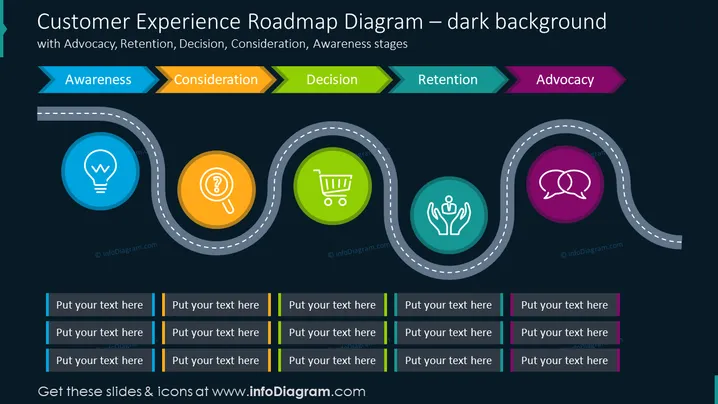
This is a customer experience presentation that shows the process of a customer's journey through purchasing your products and services. You can present the customer experience strategy by explaining the five main stages or touchpoints such as awareness, consideration, decision, retention, and advocacy. We have also left several text blocks for every stage, where you can explain the main needs or pains. All graphic icons and vectors are editable, so you can resize them however you find them suitable without any quality loss. You can also download and paste this slide design into Google Slides and Keynote.
##Slide infographic description:
Dark Theme Background, Colorful Ribbon Arrow-Shaped Banners, Grey Text Blocks, Colorful Frames, Road Vector, Lightbulb Icon, Idea Icon, Research Icon, Trolley Shopping Cart Icon, Customer Retention Icon, Round Speech Bubbles Icon



