
Reviews
Sus gráficos añaden un toque agradable a mis presentaciones y recientemente los usé para una de mis reuniones generales. Su conjunto de herramientas añade profesionalismo a mis diapositivas. En lugar de usar imágenes prediseñadas estándar.
Necesitaba un aspecto fresco para algunas de mis diapositivas. Había intentado encontrar una forma de crear un efecto de pincel, de subrayar, acentuar, añadir algo de color y los marcadores escritos a mano fueron justo lo que necesitaba. Muy fácil de usar, fácil de ajustar el tamaño, cambiar el color. Fue una solución asequible y perfecta, y estoy feliz de recomendarla.
El aspecto nítido y limpio de los gráficos, y el hecho de que me permitiera editar y cambiar fácilmente los colores para que coincidieran con la plantilla fue mi principal razón para comprarlos.
Description
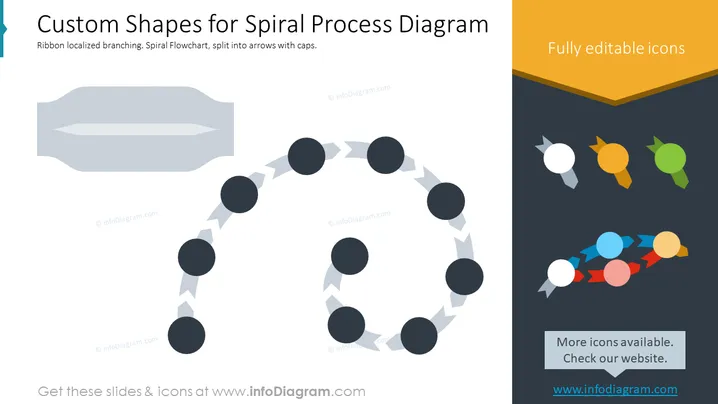
Custom Shapes for Spiral Process Diagram
Slide Content
This PowerPoint slide highlights the customizable features for creating spiral process diagrams. It demonstrates a ribbon-like branching spiral flowchart, where each segment of the spiral is depicted by arrow shapes capped with circles. The circles could symbolize stages or milestones in a process, and the arrowed lines represent the flow or progression from one stage to the next. Additional icons are shown in a variety of colors on the right side to indicate full editability and the availability of more options to tailor the diagram for different needs or presentations.
Graphical Look
- The slide has a clean and modern design with a light background.
- A large, gray, ribbon-like shape occupies the upper left side of the slide, partially fading out, which might represent a placeholder or banner for additional information.
- In the center, there's a circular spiral made of dark circles connected by arrow shapes, showing a clockwise progression sequence.
- On the right, there's a prominent triangle with a flattened bottom, colored yellow-orange, bearing the text "Fully editable icons."
- Below the triangle, various pin-shaped icons in multiple colors (white, orange, green, blue, and red) are arranged, followed by a multicolored arrow pointing right.
- A small, rectangular, slightly transparent banner with the text "More icons available. Check our website." floats above a dark footer.
The overall look of the slide is sleek and professional, utilizing icons and shapes to convey a process or flow. The color palette consists of muted tones with small spots of vibrant colors to draw attention to key elements.
Use Cases
- To explain step-by-step processes or workflows in business or educational presentations.
- For project management presentations outlining tasks or phases in a circular or iterative process.
- In marketing materials to show customer journey maps or a cycle of continual improvement.
- As a visual tool in training materials to demonstrate recurring procedures or systems.
How to Edit
How to edit text & colors

How to expand / shorten diagram

How to Replace Icons in infoDiagram PPT


