
Reviews
Ihre Grafiken verleihen meinen Präsentationen eine nette Note, und ich habe sie kürzlich für eines meiner All-Hands-Meetings verwendet. Ihre Toolbox verleiht meinen Folien Professionalität, anstatt Standard-Clipart zu verwenden.
Ich brauchte einen neuen Blick auf einige meiner Folien. Ich habe versucht, einen Weg zu finden, einen Pinselschlag-Effekt zu erzielen, um zu unterstreichen, hervorzuheben, Farbe hinzuzufügen, und die handgeschriebenen Markierungen waren genau das Richtige. Sehr einfach zu bedienen, leicht in der Größe zu ändern, die Farbe zu ändern. Es war eine erschwingliche, perfekte Lösung und ich empfehle sie gerne weiter.
Die klare, saubere Optik der Grafiken und die Tatsache, dass ich die Farben leicht bearbeiten und an die Vorlage anpassen konnte, war mein Hauptgrund für den Kauf.
Description
Custom Shapes for Modules, Levels and Loops
Slide Content
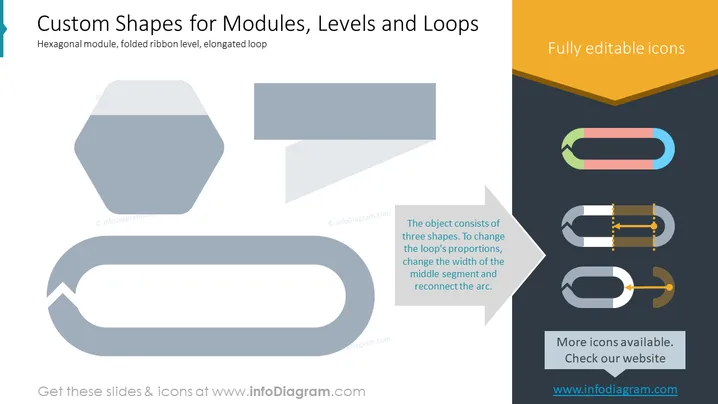
The PowerPoint slide titled "Custom Shapes for Modules, Levels and Loops" displays three main concepts: Hexagonal module, folded ribbon level, and elongated loop, each represented by a distinct graphical shape. The hexagonal module suggests a strong structure, potentially for compartmentalizing information. The folded ribbon level indicates a progression or hierarchy, useful for displaying levels of achievement or priority. Lastly, the elongated loop represents a cyclical process or continuous sequence, which can help in demonstrating workflows or repetitive tasks.
Graphical Look
- The slide has a neutral white background with contrasting graphics.
- A large hexagonal shape in a light gray color is prominently displayed on the left.
- A ribbon-like shape, also in light gray, begins in the top middle and folds across itself, then extends downward.
- An elongated looped shape appears on the lower left side, resembling a flowchart element.
- Three smaller icons aligned horizontally on the right side demonstrate customization options; they show a basic rectangular loop, a loop with adjustable segments, and an arrow indicating the concept of reconnecting parts of the loop.
- The text is concise with two side notes in smaller font conveying additional information, one on the right explaining the customization of the loop shape and another at the bottom mentioning more icons.
The slide is minimalistic and clean, with a focus on visual elements and brief, informative text. The graphical elements are bold, and the use of color-contrasting text and design elements effectively highlights the slide's key information.
Use Cases
- Illustrating the elements of a business model or framework, using the shapes to represent different parts or modules.
- Demonstrating levels within an organizational structure or progression in employee training programs with the folded ribbon graphic.
- Depicting a business process or workflow that involves recurring tasks or phases with the elongated loop shape.
- Clarifying concepts in a marketing presentation that require visual metaphors for hierarchy, interconnected systems, or iterative development.
How to Edit
How to edit text & colors

How to expand / shorten diagram

How to Replace Icons in infoDiagram PPT


