
Reviews
Your graphics add a nice touch to my presentations and I recently used them for one of my all-hands meetings. Your toolbox adds professionalism to my slides. Instead of using standard clipart.
I needed a fresh look at some of my slides. I've tried to find a way to create a paintbrush effect, to underline, accentuate, add some color and the handwritten markers were just the things. Very easy to use, easy to size, change the color. It was an affordable, perfect solution and I'm happy to recommend it.
The crisp, clean look of the graphics, and the fact that it allowed me to easily edit and change the colors to match the template was my main reason for purchasing them.
Description
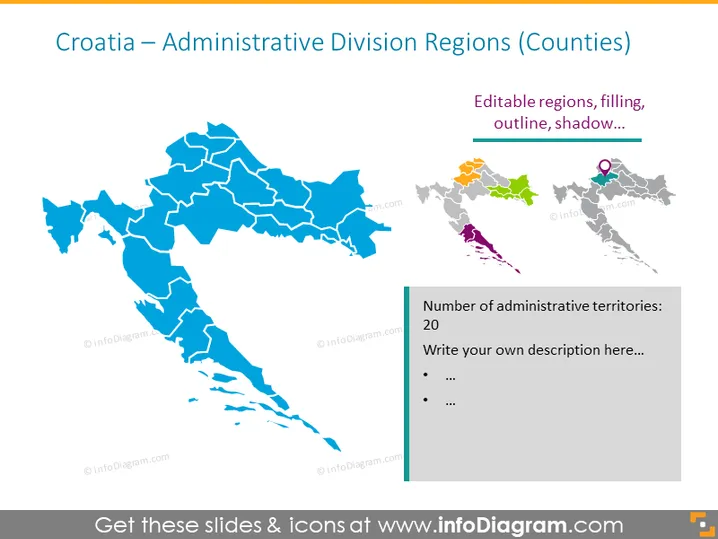
Croatia – Administrative Division Regions (Counties)
Slide Content
The slide presents a detailed illustration of the administrative division of Croatia into regions or counties, depicted through a large, editable map that spans the majority of the slide space. This map is clearly color-coded to delineate the various territories and includes subtle details such as shadows and outlines to enhance visual clarity. To the right, smaller inset maps highlight editable regions, and a text box enumerates the number of administrative territories, indicating a placeholder for additional descriptions or notes related to the regions.
Graphical Look
- A prominent map of Croatia occupies the central area of the slide, featuring shades of blue for the regions.
- The country is divided into clearly marked counties with visible boundaries.
- In the top right corner, there are two smaller inset maps, with one showing the counties in different colors and another with a map marker icon, implying a point of interest or focus.
- A rectangular text box on the right side of the slide includes a heading and bullet points for custom descriptions.
- The text and graphical elements follow a consistent color scheme with blues and neutral grey tones for a professional and clean look.
- There is a fine line used as thematic separation between the title and subtitle in the slide header.
The overall graphical design is clean, with a professional color scheme, focused on visualizing geographical data in an easy-to-understand format. This creates a functional yet engaging visual for presenting regional information.
Use Cases
- To present demographic or economic data about Croatia at a regional level in business or academic presentations.
- For illustrating regional strategies or marketing plans specific to different counties within Croatia.
- As a visual aid during discussions of public policies, infrastructure projects, or investment opportunities targeted at certain administrative divisions.
- In educational settings to teach about the geography and administrative structure of Croatia.
How to Edit
How to edit text & colors

How to expand / shorten diagram

How to Replace Icons in infoDiagram PPT


