
Reviews
Ihre Grafiken verleihen meinen Präsentationen eine nette Note, und ich habe sie kürzlich für eines meiner All-Hands-Meetings verwendet. Ihre Toolbox verleiht meinen Folien Professionalität, anstatt Standard-Clipart zu verwenden.
Ich brauchte einen neuen Blick auf einige meiner Folien. Ich habe versucht, einen Weg zu finden, einen Pinselschlag-Effekt zu erzielen, um zu unterstreichen, hervorzuheben, Farbe hinzuzufügen, und die handgeschriebenen Markierungen waren genau das Richtige. Sehr einfach zu bedienen, leicht in der Größe zu ändern, die Farbe zu ändern. Es war eine erschwingliche, perfekte Lösung und ich empfehle sie gerne weiter.
Die klare, saubere Optik der Grafiken und die Tatsache, dass ich die Farben leicht bearbeiten und an die Vorlage anpassen konnte, war mein Hauptgrund für den Kauf.
Description
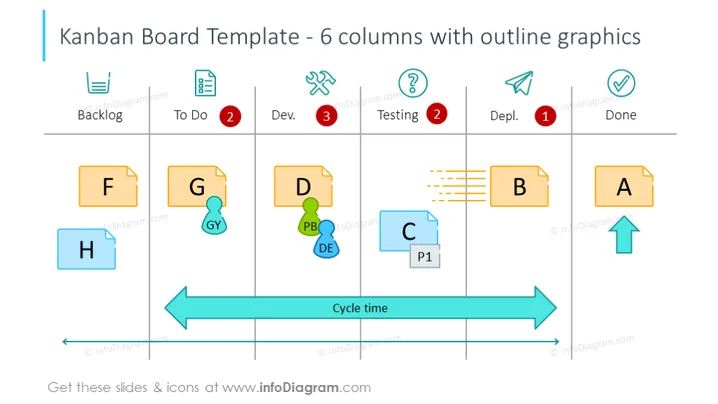
Kanban Board Template - 6 columns with outline graphics
Slide Content
The slide illustrates a Kanban Board Template with 6 columns labeled Backlog, To Do, Dev., Testing, Depl., and Done, representing stages of task completion. Each column contains cards (F, G, D, B, A, H, C) denoting tasks at various stages. Notably, 'To Do' has a red notification with "2," 'Testing' with a similar "2," and 'Depl.' with "1," suggesting a count of tasks. The 'Cycle time' arrow indicates the flow of tasks through the stages. The concept is a visual tool for managing work as it moves through a process, focusing on maximizing efficiency.
Graphical Look
- The title of the slide is in a large, bold font, contrasting against the white background.
- Six vertical, grey-colored divider lines create columns, each topped with an icon representing the stage, such as a paper list for 'Backlog' and a checkmark for 'Done.'
- Notifications are circles with numbers positioned on the 'To Do,' 'Testing,' and 'Depl.' headers, suggesting pending tasks.
- Rectangular cards represent tasks, with letters and brief labels, variously positioned across the columns.
- A prominent blue arrow spans across the bottom, labelled 'Cycle time', suggesting the continuous flow of work.
- Icons and text labels are minimalistic, outlined, and colored for visual appeal.
The slide is visually clean and well-structured, utilizing simple icons and color-coded elements to swiftly convey the stage and status of tasks. The use of colors, such as red for notifications and blue for the 'Cycle time' arrow, effectively draws attention to key components.
Use Cases
- For project management presentations to illustrate the workflow and current task statuses.
- In operations meetings to review and discuss the process efficiency and identify bottlenecks.
- During agile or scrum training sessions to introduce and explain the Kanban method.
- To provide visual updates on work progress in team briefings or client updates.
How to Edit
How to edit text & colors

How to expand / shorten diagram

How to Replace Icons in infoDiagram PPT


