
Reviews
Ihre Grafiken verleihen meinen Präsentationen eine nette Note, und ich habe sie kürzlich für eines meiner All-Hands-Meetings verwendet. Ihre Toolbox verleiht meinen Folien Professionalität, anstatt Standard-Clipart zu verwenden.
Ich brauchte einen neuen Blick auf einige meiner Folien. Ich habe versucht, einen Weg zu finden, einen Pinselschlag-Effekt zu erzielen, um zu unterstreichen, hervorzuheben, Farbe hinzuzufügen, und die handgeschriebenen Markierungen waren genau das Richtige. Sehr einfach zu bedienen, leicht in der Größe zu ändern, die Farbe zu ändern. Es war eine erschwingliche, perfekte Lösung und ich empfehle sie gerne weiter.
Die klare, saubere Optik der Grafiken und die Tatsache, dass ich die Farben leicht bearbeiten und an die Vorlage anpassen konnte, war mein Hauptgrund für den Kauf.
Description
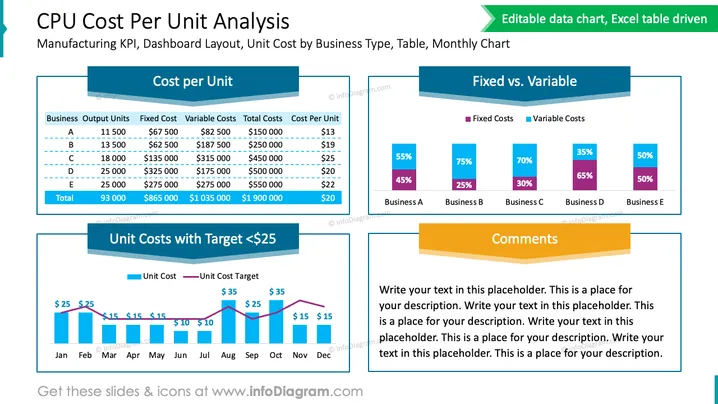
CPU Cost Per Unit Analysis
Slide Content
The slide titled "CPU Cost Per Unit Analysis" is structured with several graphical and textual components to reflect manufacturing key performance indicators (KPIs), a dashboard layout, and unit cost by business type. It includes a table summarizing output units, fixed costs, variable costs, total costs, and cost per unit for business types A through E. A bar chart depicts the unit costs with the target set at $25, while another bar chart compares fixed versus variable costs across businesses. A placeholder for comments is also available to add relevant notes.
Graphical Look
- The slide has a bright blue and green color theme with distinct color blocks for each section.
- The title of the slide is prominent at the top in a large, bold font with a green underline.
- There is a table on the left with alternating row colors for clarity and dashed lines connecting data points.
- Two bar charts: one at the top right indicates fixed versus variable costs using contrasting colors, and one at the bottom left tracks unit costs against a fixed target over a twelve-month period with columns and a line graph overlaid.
- A yellow rectangular text box labeled "Comments" occupies the lower right area, intended for additional notes or analysis.
- All charts and the table are labeled with subheaders in a bold font and color matching their respective sections.
- Icons indicating editing possibilities and Excel data connectivity are in the upper right of the slide.
The slide uses a clean layout and visually distinct sections to convey complex data in an easily digestible format. The contrast in colors and clear labeling aids in quick comprehension of the presented data.
Use Cases
- Presenting monthly financial reviews to outline costs and performance against targets.
- Sharing business unit performance data in strategic planning meetings and discussions.
- Providing visual context in management reports or investment pitches to illustrate cost structures.
- Using in workshops or seminars focused on cost management and efficiency practices.
How to Edit
How to edit text & colors

How to expand / shorten diagram

How to Replace Icons in infoDiagram PPT


