
Reviews
Your slides are my "secret sauce" when it comes to presenting my ideas to clients. I save a lot of time.
J'avais un délai de livraison à respecter et je n'avais pas le temps de créer une variété de modèles de diapositives. Infodiagram m'a proposé des options faciles à télécharger et à personnaliser en fonction de mes besoins !
Vos diapositives suscitent souvent de précieux commentaires et idées de la part de mon équipe, ce qui améliore les diapositives finales.
Description
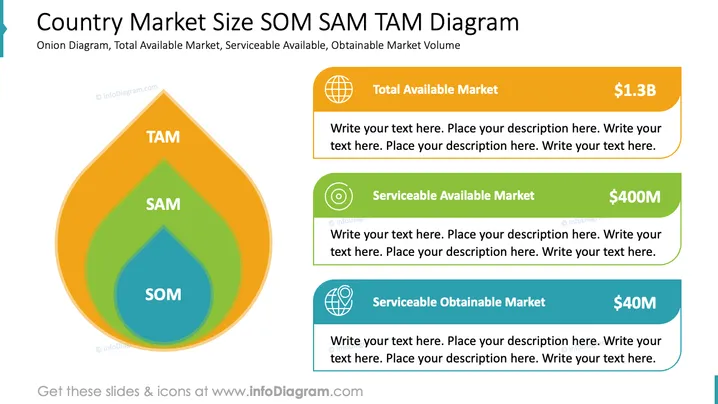
Country Market Size SOM SAM TAM Diagram
Slide Content
The slide illustrates the market size framework using an onion diagram. It explains three key concepts: Total Available Market (TAM) representing the overall demand for a product or service ($1.3B), Serviceable Available Market (SAM) depicting the segment of the TAM targeted by a company's products ($400M), and Serviceable Obtainable Market (SOM) indicating the portion of the SAM that can be captured realistically ($40M).
Graphical Look
- The slide features an onion-shaped diagram with three layers in varying colors: orange, green, and blue.
- Each layer is labeled with large white text, indicating TAM, SAM, and SOM.
- On the right, there are three rounded rectangular boxes with respective colors matching the layers.
- Each box contains descriptive text areas, icons denoting markets, and bold numerical figures to indicate market size.
- The visual layout is clean and organized, facilitating the understanding of market concepts.
The slide employs a visually appealing color scheme and systematic design to effectively convey different market segments in a clear manner. The use of icons and numbered figures enhances the understanding of the complex market size framework.
Use Cases
- Presenting a market analysis to stakeholders or executives.
- Explaining business strategy in a product development meeting.
- Educating a sales team on potential market opportunities.
- Showcasing market growth opportunities to potential investors.
How to Edit
How to edit text & colors

How to expand / shorten diagram

How to Replace Icons in infoDiagram PPT


