
Reviews
Your slides are my 'secret sauce' when it comes to visualising my ideas to clients. I'm saving so much time.
InfoDiagram has been a wonderful resource since I found the product site a few years ago.
Your slides often generate good comments and ideas from my team that improve the final slides.
Description
Country Macroeconomics Dashboard
Slide Content
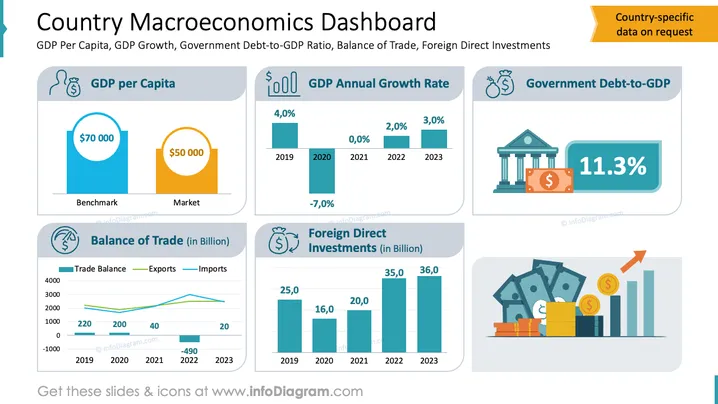
The slide provides an overview of key macroeconomic indicators:
- GDP per Capita: Shows income level measured by average earnings.
- GDP Annual Growth Rate: Presents economic performance year-over-year.
- Government Debt-to-GDP: Indicates the country's financial health.
- Balance of Trade: Compares exports and imports impact on economy.
- Foreign Direct Investments: Shows investor confidence in billions.
Graphical Look
- Layout: The slide uses a neatly organized grid layout with multiple sections.
- Colors: Utilizes blue, teal, and orange for visual emphasis and differentiation.
- Icons: Includes icons representing GDP, growth, debt, trade, and investment for clarity.
- Charts: Bar charts and line graphs effectively display data trends over time.
- Illustration: Features a graphic of money, building, and upward arrow symbolizing economic improvement.
The slide has a professional and informative design, making complex data easily accessible. It uses color coding and icons to provide a clear and quick understanding of macroeconomic indicators.
Use Cases
- Economic Reports: Ideal for presenting economic data in reports.
- Investment Pitches: Useful for illustrating economic stability to potential investors.
- Policy Discussions: Assists in discussions on economic policies and decisions.
- Financial Forecasts: Helpful in projecting economic trends and market analysis.
How to Edit
How to edit text & colors

How to expand / shorten diagram

How to Replace Icons in infoDiagram PPT


